| DSP Blockset | Search Help Desk |
Inspecting Sample Rates
When constructing a frame-based or multirate model, it is often helpful to check the sample rates that Simulink computes for different signals. There are two basic ways to inspect the sample rates in a model:Probe Block
Connect Simulink's Probe block to any line to display the period of the signal on that line. The period is displayed in the block icon itself (together with the line width and data type, if desired), making it easy to verify that the sample rates in the model are what you expect them to be. When the line width and data type displays are suppressed (by deselecting the appropriate check boxes in the block dialog box), the Probe block looks like this:
The block displays the label Ts, followed by a two-element vector. The first (left) element is the period of the signal being measured. The second (right) is the signal's sample time offset, which is usually 0, as described in "Sample Time Offsets" above.
Ts label in the block icon along with the period of the signal. Be aware, however, that when measuring frame-based signals, the value displayed by the Probe block is the frame period, Tf, not the sequence sample period, Ts.
Frame Period vs. Sample Period.
It is important to distinguish between the frame period and the sample period of a frame-based signal.
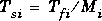
The input frame period (Tfi) of a frame-based signal is the time interval between consecutive vector or matrix inputs to a block. This interval is what the Probe block displays when you connect it to an input line. Similarly, the output frame period (Tfo) is the time interval at which the block updates the vector or matrix value at the output port. This interval is what the Probe block displays when you connect it to the output line.
In contrast, the sample period, Ts, is the time interval between individual samples in a frame, which is always shorter than the frame period itself. The sample period of the sequence contained in consecutive frames is the quotient of the frame period and the frame size, M.

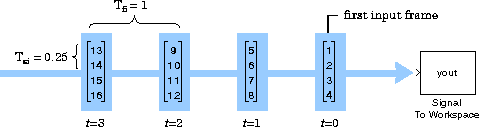
In most cases, the sequence sample rate, Tsi, is of primary interest, and the frame rate is simply a secondary result of the frame size that you choose for the signal. For a sequence with a particular sample period, a larger frame size corresponds to a slower frame rate, and vice versa.
Probe Block Example. The three Probe blocks in the sample-based model below verify that the scalar signal's sample period is halved with each upsample operation: The output from the Signal From Workspace block has a sample period of 16, the output from the first Upsample block has a sample period of 8, and the output from the second Upsample block has a sample period of 4.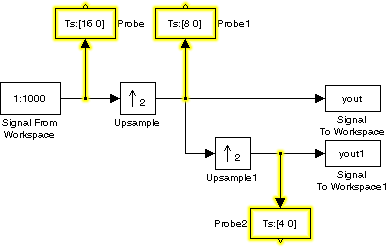
Sample Time Color Coding
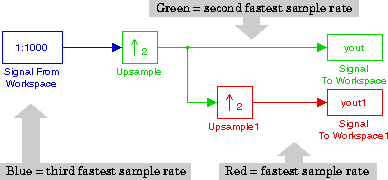
Turn on Simulink's sample time color coding option by selecting Sample time colors from the Format menu. Here's the above model with the Probe blocks removed and sample time color coding turned on.