Avg_Freight_Cost table to verify the results.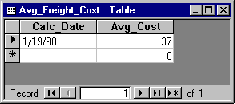
| Database Toolbox User's Guide | Search Help Desk |
Exporting Data from MATLAB, Replacing Existing Data in a Database
In this part of the tutorial, you export data from MATLAB to a database, updating existing data in the database. Specifically, you update the data you previously imported into theAvg_Freight_Cost table.
You use these Database Toolbox commands:
If you want to see or copy the commands for this part of the tutorial, or if you want to run the set of commands, use the M-file matlab\toolbox\database\dbdemos\dbupdatedemo.m.
connA = database('SampleDB', '', '');
colnames = {'Calc_Date', 'Avg_Cost'}
C = cell(1,2);
D = '1/20/98';
meanA = 36.6067;
C = {D, meanA}
C =
    '1/20/98'    [36.6067]
Avg_Freight_Cost table is incorrect and
instead should be 1/19/98. Type:
D = '1/19/98'
C, which contains the data you
will export.
C(1,1) = {D}

C =
    '1/19/98'    [36.6067]
where statement and assign it to the variable whereclause. The record to be
updated is the record that has 1/20/98 for the Calc_Date.
whereclause = 'where Calc_Date = ''1/20/98'''

whereclause =
where Calc_Date = '1/20/98'
Calc_Date is 1/20/98.
update(connA, 'Avg_Freight_Cost', colnames, C, whereclause)
Avg_Freight_Cost table to verify the results.close(cursorA) close(conn)