| Data Acquisition Toolbox | Search Help Desk |
Reordering Channels
As described in "Adding Channels to an Analog Input Object", when channels are added to a device object with theaddchannel function, a mapping is defined between hardware channel IDs and MATLAB indices. This mapping allows you to configure specific hardware channels to suit your data acquisition needs.
If you are using scanning hardware, then this mapping also establishes the channel scanning order. The hardware scan order is given by the elements of the HwChannel property. Namely, the first HwChannel element is sampled first, the second HwChannel element is sampled second, and so on. The scan order can be easily displayed by typing the name of the device object at the MATLAB command line and observing the elements of HwChannel. Under certain circumstances, you may want to explicitly reorder an existing channel group. There are three ways hardware channels can be reordered:
Swapping MATLAB Indices
You can reorder an existing channel group by swapping the MATLAB indices of the channels with theChannel property.
For example, suppose you created the analog input object myAI and added hardware channels 0-2 to it. If the second hardware channel is to be a trigger, but you want that channel to be the first one sampled, then you can swap the indices for channels one and two.
myAI = analoginput('nidaq', 1);
addchannel(myAI, 0:2);
myAI.Channel(1:3) = myAI.Channel([2 1 3])
Adding Channels to an Existing Channel Group
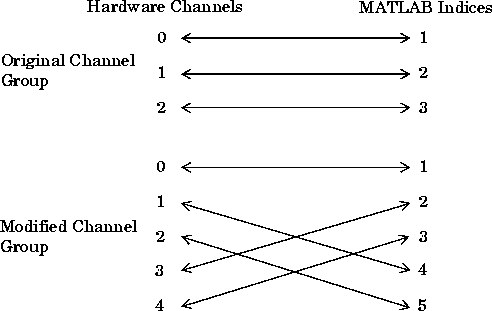
Channel reordering can occur when you add channels to an existing channel group. When adding channels, these rules must be followed:myAI using the next available indices.
addchannel(myAI, 3:4);
myAI and assigned indices 2 and 3.
addchannel(myAI, 3:4, 2:3);
Deleting Channels From an Existing Channel Group
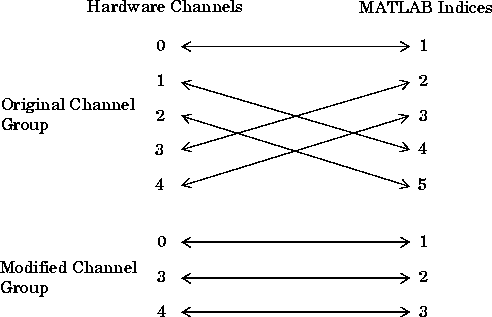
You can delete channels from a channel group with thedelete command. When a channel is deleted, it is removed from the channel group and the indices of the remaining channels are reindexed such that the rules described on page 4-11 are satisfied.
For example, suppose you want to delete hardware channels 1 and 2 from the modified channel group shown above.
The new channel group now contains hardware channels 0, 3, and 4 which correspond to the indices 1,2, and 3. The figure below illustrates this situation.chans = myAI.Channel(4:5);delete(chans);
clear command. clear removes the variable from the MATLAB workspace but it does not remove objects from the engine.
Note:
clear and delete functions are not equivalent.