| Data Acquisition Toolbox | Search Help Desk |
Copying Device Objects and Channels
You can keep multiple versions of a device object or channels in the MATLAB workspace by copying them to a new MATLAB variable. Copying device objects and channels are discussed below.Copying Device Objects
The example code below illustrates how to copy a device object. It is important to note that the copied object is identical to the original object. This can be seen by setting a property for the original object and returning the value of that property from the copied object.myAI = analoginput('nidaq', 1);
addchannel(myAI, 0:1);
newAI = myAI;
set(myAI, 'SamplesPerTrigger', 10000);
get(newAI, 'SamplesPerTrigger')
ans =
10000
The reason that myAI and newAI return the same property value is because both device objects reference the same data acquisition engine object as illustrated in the figure below.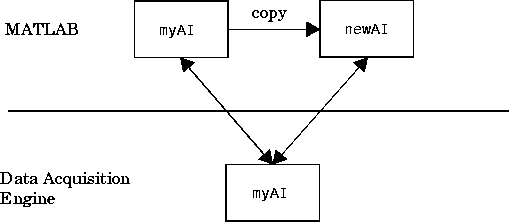
delete(myAI);
newAI
newAI =
Invalid Data Acquisition object.
This object is not associated with any hardware and
should be removed from your workspace using CLEAR.
Note:
clear command. clear removes the variable from the MATLAB workspace but it does not remove objects from the engine. To remove objects from the engine, the delete command must be used.
Copying Channels
As shown on page 4-4, it is often useful to copy channels to a new variable with a short name and then reference the channels by that name. For example, to copymyAI's entire channel group to a new variable chans
chans = myAI.Channel;
chans than myAI.Channel. When referencing chans, you can set only channel property values. To configure common property values, you must reference myAI or a copy of myAI.
You can copy the first channel contained by myAI to a new variable chan1 by indexing into the Channel property.
chan1 = myAI.Channel(1);
chans.
chan1 = chans(1);
delete(myAI.Channel(1))
delete(chans(1))
delete(chan1)
Deleting channels is discussed in detail on page 4-12.