Adding Text Strings to a Graph
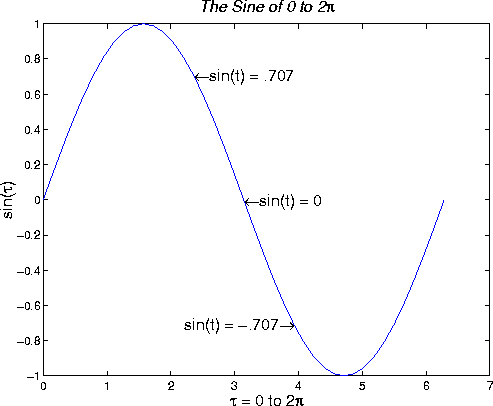
You can place a text string at any location on the plot using the text function. This function positions the text string in the data space of the plot. For example, to label three data points on a graph, create three text strings:
text(3*pi/4,sin(3*pi/4),...
     '\leftarrowsin(t) = .707',...
     'FontSize',16)

text(pi,sin(pi),'\leftarrowsin(t) = 0',...
     'FontSize',16)

text(5*pi/4,sin(5*pi/4),'sin(t) = -.707\rightarrow',...
     'HorizontalAlignment','right',...
     'FontSize',16)
The HorizontalAlignment of the text string 'sin(t) = -.707 \rightarrow' is set to right to place it on the left side of the point [5*pi/4,sin(5*pi/4)] on the graph:
Placing Text Interactively
You can place character strings on graphs interactively using the gtext function. This function accepts a string as an argument and waits while you select a location on the graph with the mouse. MATLAB then displays the text string at the indicated location.
gtext is a convenient way to annotate your graph if you do not want precise positioning of the text. It works only on 2-D graphs.
You can also use Plot Editor to place text interactively on your graph. See the Plot Editor documentation for more information.
[ Previous | Help Desk | Next ]