| Statistics Toolbox | Search Help Desk |
| boxplot | Examples |
Syntax
boxplot(X)
boxplot(X,notch)
boxplot(X,notch,'sym')
boxplot(X,notch,'sym',vert)
boxplot(X,notch,'sym',vert,whis)
Description
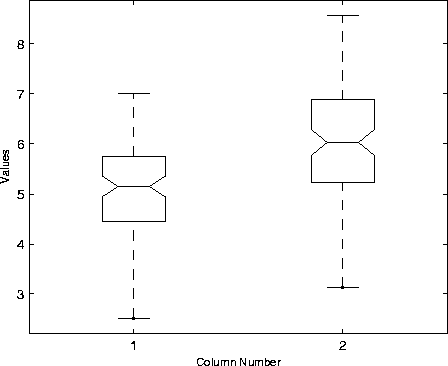
boxplot(X) produces a box and whisker plot for each column of X. The box has lines at the lower quartile, median, and upper quartile values. The whiskers are lines extending from each end of the box to show the extent of the rest of the data. Outliers are data with values beyond the ends of the whiskers. If there is no data outside the whisker, there is a dot at the bottom whisker. The dot color is the same as the whisker color. boxplot(X,notch) with notch = 1 produces a notched-box plot. Notches graph a robust estimate of the uncertainty about the means for box to box comparison. The default, notch = 0 produces a rectangular box plot. boxplot(X,notch,'sym') where 'sym' is a plotting symbol allows control of the symbol for outliers if any (default = '+'). boxplot(X,notch,'sym',vert) with vert = 0 makes the boxes horizontal (default: vert = 1, for vertical) boxplot(X,notch,'sym',vert,whis) enables you to specify the length of the "whiskers". whis defines the length of the whiskers as a function of the inter-quartile range (default = 1.5 * IQR.) If whis = 0, then boxplot displays all data values outside the box using the plotting symbol, 'sym'.Examples
x1 = normrnd(5,1,100,1);
x2 = normrnd(6,1,100,1);
x = [x1 x2];
boxplot(x,1)
The difference between the means of the two columns of x is 1. We can detect this difference graphically since the notches do not overlap.