| Using Stateflow | Search Help Desk |
Using the Notation Efficiently
Designing for Efficiency
The Stateflow notation supports many different ways of representing desired system behavior. The representation you choose directly affects the efficiency of the generated code. You can use the notation to optimize for these code attributes:Optimizing for Speed
If execution speed is the most important efficiency criterion for the generated code, take advantage of the top-down processing of events. Designing the Stateflow diagram so that execution of speed-critical actions occurs at the highest hierarchy level possible will produce speed-efficient code. Taking advantage of the ability to specify an event's parent (within the hierarchy) provides speed optimizations. You can make sure that an event's broadcast scope is as specific as possible to avoid unnecessary event broadcasting. See "Defining Events" for more information.You can also use thesend action language function to further qualify the receiver of an event broadcast (directed event broadcasting). See "Directed Event Broadcasting" for more information.
This example Stateflow diagram shows the use of top-down event processing to optimize the event-handling speed.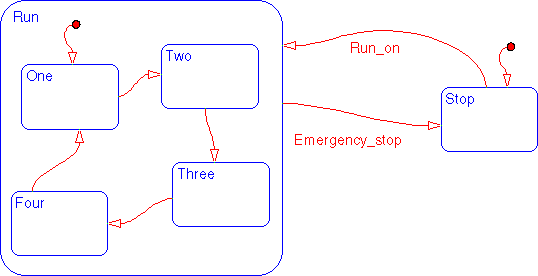
Emergency_stop occurs and the system should transition to the Stop state as quickly as possible. By drawing the Emergency_stop transition from the Run superstate border to the Stop state, the transition is evaluated at the highest level in the hierarchy. Using this notation, if any of Run substates are active and the Emergency_stop event occurs, the system transitions to the Stop state. The alternative to this notation is to have individual transitions (originating from a lower level in the hierarchy) from each of Run's substates. The event handling of the alternative is less speed efficient.
See "Example: Directed Event Broadcast Using send" and "Example: Directed Event Broadcast Using Qualified Event Names" for examples using the send action language function.
Optimizing for Code Size
Simplifying Stateflow diagrams results in less generated code. The fewer transitions, the simpler the Stateflow diagram is. Use of hierarchy, history junctions, and inner transitions reduces the number of transitions. In this example, if eventReset occurs and any substate of Run is active, you want to exit and re-enter that same substate. For example, when the substate is re-entered, its entry action is executed. This example uses many transitions to represent the logic.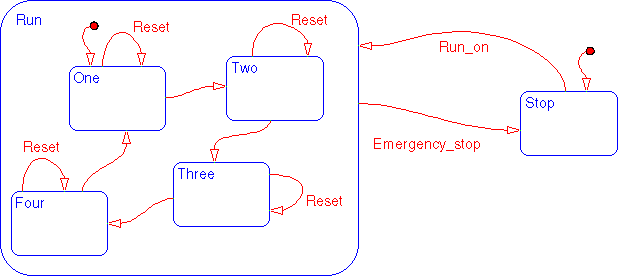
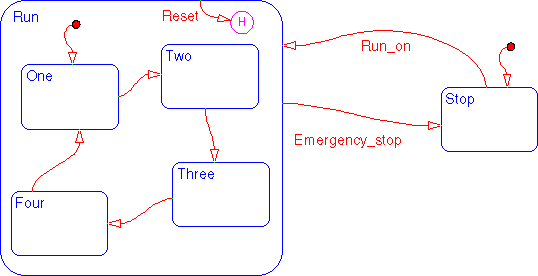
Optimizing for Memory Use
The use of flow diagram notation in a Stateflow diagram can produce efficient code optimized for memory use. In some cases, specifying actions using flow diagram notation is a closer representation of the system's logic and avoids the use of unnecessary states. Reducing the number of states optimizes for memory use. This example shows the use of flow diagram notation to represent afor loop.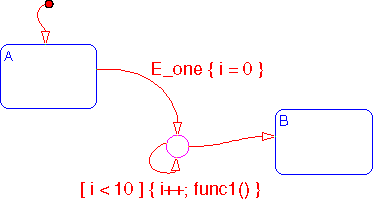
A to state B is divided into segments. Two of the segments are labeled with condition actions {i = 0} and {i++; func1()}. Using the Connective junction and condition action notation in this manner is a closer representation of a for loop than could be otherwise represented using states. The elimination of unnecessary states also optimizes the use of memory.
For data that does not need to be persistent, use of Temporary data objects provides a memory-use optimization. Defining i to be a Temporary data object (parented by the chart) also improves memory use. See "Data Scope" for more information on Temporary data objects.