Defining the Stateflow Interface
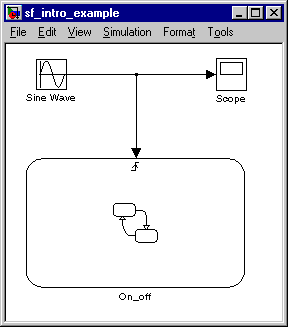
Make connections in the Simulink model between other blocks and the Stateflow block:
- 1
- Enter
simulink in the MATLAB command window to invoke Simulink.
- 2
- Add a Sine Wave block (located in the Simulink Sources block library) and
connect it to the input trigger port of the Stateflow block.
- 3
- Add a Scope block (located in the Simulink Sinks block library) and connect
it to the Sine Wave block output as well. Your model should look similar to
this.
[ Previous | Help Desk | Next ]