Setting Event Properties
An event is defined by its properties. You can redefine an event by resetting its properties.
To set an event's properties:
- 1
- Select Explorer from the Stateflow editor's Tools menu.
- 2
- Select the event in the Explorer's object hierarchy pane.
- 3
- Double-click on the event's entry in the Explorer's contents pane.
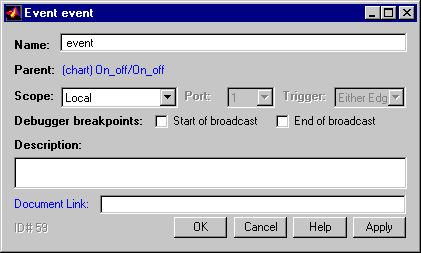
- Stateflow displays the Event dialog for the selected event.
- 4
- Edit the properties displayed in the dialog to suit the event's intended usage.
- See "Event Properties" for a description of the various properties
that events can have and information on how to set the properties.
- 5
- Select OK to apply your changes and dismiss the Event dialog.
Note
You can also set an event's Scope (see "Defining Local Events") and Trigger properties by editing the corresponding fields in the event's entry in the Explorer's contents pane. If you want to set only these properties, you do not need to open the Event dialog for the event.
[ Previous | Help Desk | Next ]