| Using Stateflow | Search Help Desk |
Using the Stateflow Editor
The Stateflow Editor consists of a window for displaying a state diagram and a set of commands that allow you to draw, zoom, modify, print, and save a state diagram displayed in the window.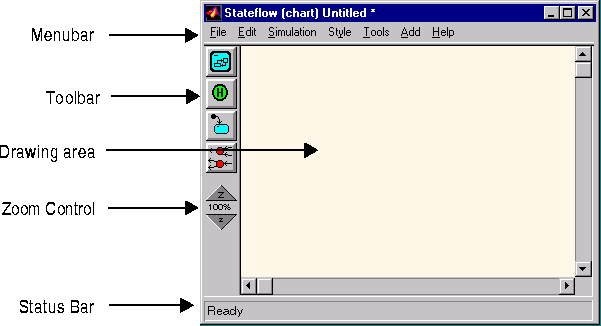
Most editor commands are available from the menubar.
These menus pop-up from the drawing area when you press the right mouse button. These menus display commands that apply only to the currently selected object or to the chart as a whole, if no object is selected. See "Displaying Shortcut Menus" for more information.
Displays a set of tools for creating state diagrams. See "Displaying Shortcut Menus" for more information.
Displays an editable copy of a state diagram.
Displays the name of the state diagram being edited followed by an asterisk if the diagram needs to be saved.
See "Exploring Objects in the Editor Window" for information on using the zoom control.
Displays tooltips and status information.