| Using Stateflow | Search Help Desk |
Specifying Code Generation Options
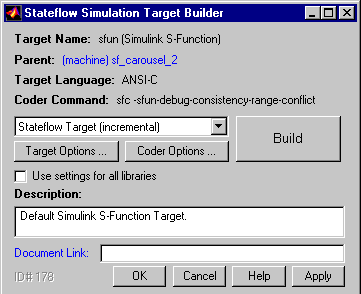
To specify code generation options: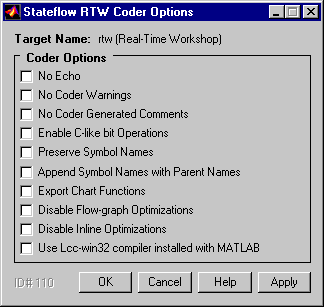
Coder Options
The Stateflow simulation coder provides the following options. Enable Debugging/Animation. Enables chart animation and debugging. Stateflow enables debugging code generation when you use the debugger to start a model simulation. You can enable or disable chart animation separately in the debugger. (The Stateflow debugger does not work with stand-alone and RTW targets. Therefore, Stateflow and Real-Time Workshop do not generate debugging/animation code for these targets, even if this option is enabled.) No Echo.. Suppress display of runtime output in the MATLAB command window, specifically actions that are not terminated by a semicolon. No Coder Warnings.. Suppress display of coder warnings in the MATLAB command window. No Coder Generated Comments.. Causes the coder to omit comments from generated code. Enable C-Like Bit Operations. Causes the coder to recognize C bit-wise operators (~, &, |, ^, >>, etc.) in action language statements and encode these operators as C bit-wise operations. Preserve Symbol Names. Causes the coder to preserve symbol names (names of states and data) when generating code. This is useful when the target contains custom code that accesses state machine data. Note that this option can generate duplicate C symbols if the source chart contains duplicate symbols, for example, two substates with identical names. Enable the next option to avoid duplicate substate names. Append Symbol Names with Parent Names. Generates a state or data name by appending the name of the item's parent to the item's name. Export Chart Functions. Exports the names of generated functions so that they can be invoked by user-written C code. Disable Flow-Graph Optimizations. Disables detection and elimination of redundant "goto" statements and dead code to facilitate debugging. Disable Inline Optimizations. Disables inlining of state entry and exit functions for leaf states and optimization of state entry functions for all states. Disabling such optimizations can facilitate debugging. NoteInline optimizations are disabled when you select Enable Debugging/Animation regardless of whether the Disable Inline Optimizations option is checked or unchecked.
Use Lcc-win32 compiler installed with MATLAB.
Checking this option causes Stateflow to use the lcc compiler to build this target. See "Setting Up Build Tools on Windows" for more information.