Generate a step function.
Library
Sources
Description
The Step block provides a step between two definable levels at a specified time. If the simulation time is less than the Step time parameter value, the block's output is the Initial value parameter value. For simulation time greater than or equal to the Step time, the output is the Final value parameter value.
The Step block generates a scalar or vector output, depending on the length of the parameters.
Data Type Support
A Step block outputs real signals of type double.
Parameters and Dialog Box
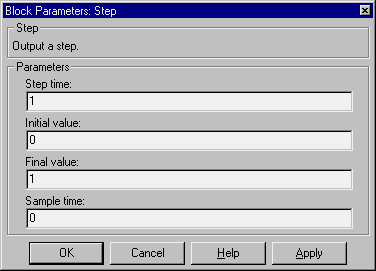
- Step time
- The time, in seconds, when the output jumps from the Initial value parameter to the Final value parameter. The default is
1 second.
- Initial value
- The block output until the simulation time reaches the Step time parameter. The default is
0.
- Final value
- The block output when the simulation time reaches and exceeds the Step time parameter. The default is
1.
- Sample time
- Sample rate of step.
Characteristics
Sample Time
|
Inherited from driven block
|
Scalar Expansion
|
Of parameters
|
Vectorized
|
Yes
|
Zero Crossing
|
Yes, to detect step times
|
[ Previous | Help Desk | Next ]