| Using Simulink | Search Help Desk |
| Hit Crossing |
Library
Signals & SystemsDescription
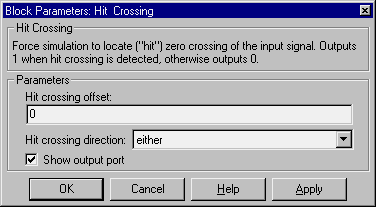
double. If the Show output port check box is selected, the block output indicates when the crossing occurs. If the input signal is exactly the value of the offset value, the block outputs a value of 1 at that time step. If the input signals at two adjacent points bracket the offset value (but neither value is exactly equal to the offset), the block outputs a value of 1 at the second time step. If the Show output port check box is not selected, the block ensures that the simulation finds the crossing point but does not generate output.
The Hit Crossing block serves as an "Almost Equal" block, useful in working around limitations in finite mathematics and computer precision. Used for these reasons, this block may be more convenient than adding logic to your model to detect this condition.
The hardstop and clutch demos illustrate the use of the Hit Crossing block. In the hardstop demo, the Hit Crossing block is in the Friction Model subsystem. In the clutch demo, the Hit Crossing block is in the Lockup Detection subsystem.
Data Type Support
A Hit Crossing block outputs a signal of typeboolean unless boolean compatibility mode is enabled (see "Enabling Strict Boolean Type Checking") in which case, the block outputs a signal of type double.
Parameters and Dialog Box
Characteristics
| Direct Feedthrough |
Yes |
| Sample Time |
Inherited from driving block |
| Scalar Expansion |
Yes |
| Vectorized |
Yes |
| Zero Crossing |
Yes, to detect the crossing |