| Using Simulink | Search Help Desk |
Stepping by Blocks
To advance a simulation one block, enterstep at the debugger prompt. The debugger executes the current block, stops, and highlights the next block in the model's block execution order (see "Displaying a Model's Block Execution Order"). For example, the following figure shows the vdp block diagram after execution of the model's first block.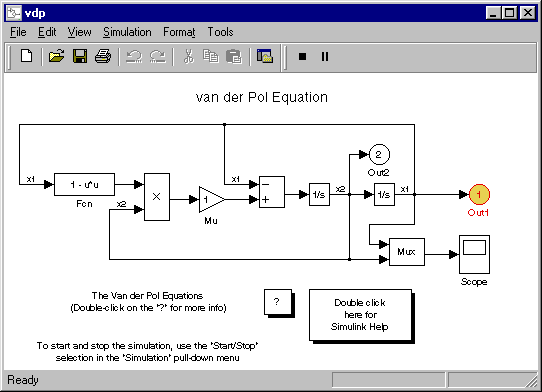
U) and outputs (Y) and redisplays the debug command prompt in the MATLAB command window. The debugger prompt shows the next block to be evaluated.
(sldebug @0:0 'vdp/Integrator1'): step
 U1 = [0]
 Y1 = [2]
(sldebug @0:1 'vdp/Out1'):
Crossing a Time Step Boundary
When you step through the last block in the model's sorted list, the debugger advances the simulation to the next time step and halts the simulation at the beginning of the first block to be executed in the next time step. To signal that you have crossed a time step boundary, the debugger prints the current time in the MATLAB command window. For example, stepping through the last block of the first time step of thevdp model results in the following output in the MATLAB command window.
(sldebug @0:8 'vdp/Sum'): step
 U1 = [2]
 U2 = [0]
 Y1 = [-2]
[Tm=0.0001004754572603832  ] **Start** of system 'vdp' outputs
Stepping by Minor Time Steps
You can step by blocks within minor time steps, as well as within major steps. To step by blocks within minor time steps, enterminor at the debugger command prompt.