Displaying Text on the Block Icon
To display text on the icon, enter one of these drawing commands.
disp('text') or disp(variablename)
text(x, y, 'text')
text(x, y, stringvariablename)
text(x, y, text, 'horizontalAlignment', halign,
'verticalAlignment', valign)
fprintf('text') or fprintf('format', variablename)
port_label(port_type, port_number, label)
The disp command displays text or the contents of variablename centered on the icon.
The text command places a character string (text or the contents of stringvariablename) at a location specified by the point (x,y). The units depend on the Drawing coordinates parameter. For more information, see "Controlling Icon Properties".
You can optionally specify the horizontal and/or vertical alignment of the text relative to the point (x, y) in the text command. For example, the command
text(0.5, 0.5, 'foobar', 'horizontalAlignment', 'center')
centers foobar in the icon.
The text command offers the following horizontal alignment options
Option
|
Aligns
|
left
|
The left end of the text at the specified point.
|
right
|
The right end of the text at the specified point.
|
center
|
The center of the text at the specified point.
|
.
The text command offers the following vertical alignment options
Option
|
Aligns
|
base
|
The baseline of the text at the specified point.
|
bottom
|
The bottom line of the text at the specified point.
|
middle
|
The midline of the text at the specified point.
|
cap
|
The capitals line of the text at the specified point.
|
top
|
The top of the text at the specified point.
|
.
The fprintf command displays formatted text centered on the icon and can display text along with the contents of variablename.
Note
While these commands are identical in name to their corresponding MATLAB functions, they provide only the functionality described above.
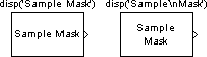
To display more than one line of text, use \n to indicate a line break. For example, the figure below shows two samples of the disp command
The port_label command lets you specify the labels of ports displayed on the icon. The command's syntax is
port_label(port_type, port_number, label)
where port_type is either 'input' or 'output', port_number is an integer, and label is a string specifying the port's label. For example, the command
port_label('input', 1, 'a')
defines a as the label of input port 1.
[ Previous | Help Desk | Next ]