| Using Simulink | Search Help Desk |
Initialization Commands
Initialization commands define variables that reside in the mask workspace. These variables can be used by all initialization commands defined for the mask, by blocks in the masked subsystem, and by commands that draw the block icon (drawing commands). Simulink executes the initialization commands when:The Mask Workspace
Simulink creates a local workspace, called a mask workspace, when either of the following occurs:mx + b example, described earlier in this chapter, the Mask Editor explicitly creates m and b in the mask workspace by associating a variable with a mask parameter. However, variables in the mask workspace are not explicitly assigned to blocks underneath the mask. Instead, blocks beneath the mask have access to all variables in the mask workspace. It may be instructive to think of the underlying blocks as "looking into" the mask workspace.
The figure below shows the mapping of values entered in the mask dialog box to variables in the mask workspace (indicated by the solid line) and the access of those variables by the underlying blocks (indicated by the dashed line).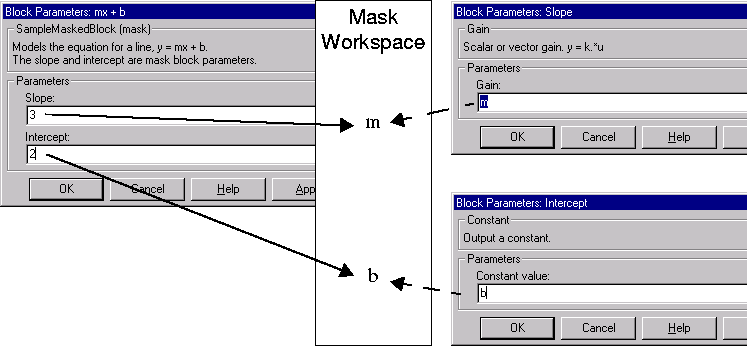
Debugging Initialization Commands
You can debug initialization commands in these ways:keyboard command in the initialization commands to stop execution and give control to the keyboard. For more information, see the help text for the keyboard command.
dbstop if errordbstop if warning
If an error occurs in the initialization commands, execution stops and you can examine the mask workspace. For more information, see the help text for the dbstop command.