| Using Simulink | Search Help Desk |
Equilibrium Point Determination
The Simulinktrim function determines steady-state equilibrium points. Consider, for example, this model, called lmod.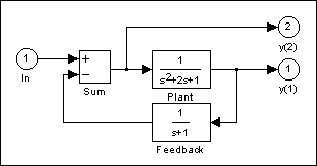
trim function to find the values of the input and the states that set both outputs to 1. First, make initial guesses for the state variables (x) and input values (u), then set the desired value for the output (y):
x = [0; 0; 0];
u = 0;
y = [1; 1];
Use index variables to indicate which variables are fixed and which can vary:
ix = [];      % Don't fix any of the states
iu = [];      % Don't fix the input
iy = [1;2];   % Fix both output 1 and output 2
Invoking
trim returns the solution. Your results may differ due to roundoff error.
[x,u,y,dx] = trim('lmod',x,u,y,ix,iu,iy)
x =
   0.0000
   1.0000
   1.0000
u =
   2
y =
   1.0000
   1.0000
dx =
   1.0e-015 *
    -0.2220
    -0.0227
     0.3331
Note that there may be no solution to equilibrium point problems. If that is the case, trim returns a solution that minimizes the maximum deviation from the desired result after first trying to set the derivatives to zero. For a description of the trim syntax, see trim.