| Using Simulink | Search Help Desk |
Using the To Workspace Block
The To Workspace block can be used to return output trajectories to the MATLAB workspace. The model below illustrates this use.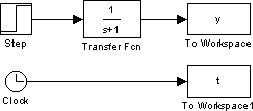
y and t appear in the workspace when the simulation is complete. The time vector is stored by feeding a Clock block into a To Workspace block. The time vector can also be acquired by entering a variable name for the time on the Workspace I/O page of the Simulation Parameters dialog box for menu-driven simulations, or by returning it using the sim command (see Chapter 4 for more information).
The To Workspace block can accept a vector input, with each input element's trajectory stored as a column vector in the resulting workspace variable.