| Using Simulink | Search Help Desk |
Using Return Variables
By returning time and output histories, you can use MATLAB plotting commands to display and annotate the output trajectories.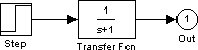
yout, is returned by the integration solver. For more information, see Chapter 4.
You can also run this simulation from the Simulation menu by specifying variables for the time, output, and states on the Workspace I/O page of the Simulation Parameters dialog box. You can then plot these results using:
plot(tout,yout)