Using the Model Browser on Windows
To display the Model Browser pane, select Model Browser from the Simulink View menu. The model window splits into two panes. The left pane displays the browser, a tree-structured view of the block diagram displayed in the right pane.
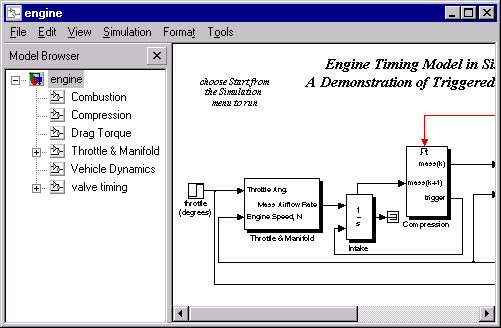
Each entry in the tree view corresponds to a subsystem in the model. You can expand/collapse the tree by clicking on the +/- boxes beside each subsystem, or by pressing the left/right arrow or +/- keys on your numeric keypad. You can move up/down the tree by pressing the up/down arrow on your keypad. Click on any subsystem to display its contents in the diagram view. To open a new window on a subsystem, double click the subsystem in the diagram view.
[ Previous | Help Desk | Next ]