| Using Simulink | Search Help Desk |
Labeling Subsystem Ports
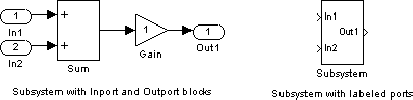
Simulink labels ports on a Subsystem block. The labels are the names of Inport and Outport blocks that connect the subsystem to blocks outside the subsystem through these ports. You can hide the port labels by selecting the Subsystem block, then choosing Hide Port Labels from the Format menu. You can also hide one or more port labels by selecting the appropriate Inport or Outport block in the subsystem and choosing Hide Name from the Format menu. This figure shows two models. The subsystem on the left contains two Inport blocks and one Outport block. The Subsystem block on the right shows the labeled ports.