Creating a Subsystem by Adding the Subsystem Block
To create a subsystem before adding the blocks it contains, add a Subsystem block to the model, then add the blocks that make up the subsystem:
- 1
- Copy the Subsystem block from the Signals & Systems library into your
model.
- 2
- Open the Subsystem block by double-clicking on it.
- 3
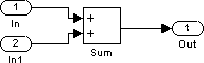
- In the empty Subsystem window, create the subsystem. Use Inport blocks to
represent input from outside the subsystem and Outport blocks to represent
external output. For example, the subsystem below includes a Sum block
and Inport and Outport blocks to represent input to and output from the
subsystem:
[ Previous | Help Desk | Next ]