| Using Simulink | Search Help Desk |
Signal Properties Dialog Box
The Signal Properties dialog box allows you to view and edit signal properties.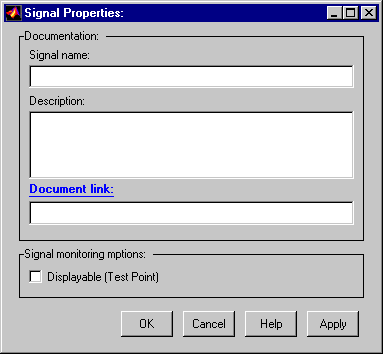
Signal Name
Name of signal.Description
Enter a description of the signal in this field.Document Link
Enter a MATLAB expression in the field that displays documentation for the signal. To display the documentation, click the field's label (that is, "Document Link"). For example, entering the expressionweb(['file:///' which('foo_signal.html')])
in the field causes MATLAB's default Web browser to display foo_signal.html when you click the field's label.
Displayable (Test Point)
Check this option to indicate that the signal can be displayed during simulation. NoteRTW storage class
Select the storage class of this signal from the list. See the Real-Time Workshop User's Guide for an explanation of the listed options.RTW storage type qualifier
Select the storage type of this signal from the list. See the Real-Time Workshop User's Guide for more information.