Component
While Loop
Category
Logical and Flow
Description
The While Loop component iteratively executes its subcomponents while the string specified in the attributes page is true. You can limit the number of repetitions to prevent infinite loops. The While Loop component must have at least one subcomponent; the purpose of this component is to run its subcomponents several times. If it does not have any subcomponents, this component does not add anything to the report.
Attributes
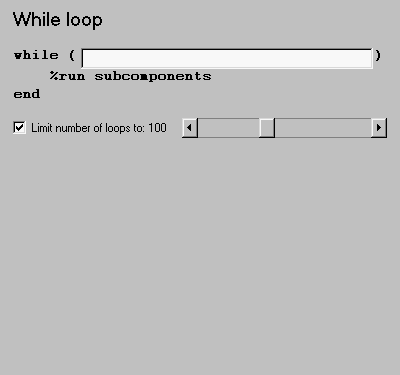
This is the While Loop attribute page.
 Note:
Note:
To view a component attribute page in the Setup File Editor, select the component in the setup file outline on the left and click on the Options tab. If the component is not in the setup file outline, you must add it to the outline first. See Chapter 4 for a discussion on how to add a component to the outline.
- while
- Enter the string to be evaluated in this field. This string should be a valid MATLAB expression that evaluates to be a 1 or 0 (true or false) in the workspace. For example, if a=1, b=2, and c=3 in the MATLAB workspace, and you enter the following at the command line
d=(a>b/c)
- then MATLAB returns the following:
d = 1
- Since
a (1) is greater than b/c (2/3), this expression is true, and evaluates to be a 1.
- Limit number of loops to
- Use this option to prevent infinite loops. Use the left and right arrows to increase or decrease the number of loops.
Insert anything into report?
Yes, as long as it has subcomponents.
Filename
clo_while
[ Previous | Help Desk | Next ]