Component
Title Page
Category
Formatting
Description
The Title Page component creates and inserts a title page at the beginning of the report.
Attributes
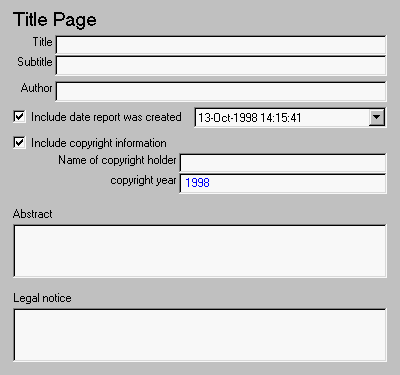
This is the Title Page attribute page.
 Note:
Note:
To view a component attribute page in the Setup File Editor, select the component in the setup file outline on the left and click on the Options tab. If the component is not in the setup file outline, you must add it to the outline first. See Chapter 4 for a discussion on how to add a component to the outline.
All of the text fields in this attribute page can contain the %<VariableName> notation. See "%<VariableName> Notation" in the Text component reference page.
- Title
- Enter the title of the report in this field. The title will appear in large font.
- Subtitle
- Enter the subtitle in this field. The subtitle will appear under the title, in a smaller font than the title.
- Author
- Enter the author in this field. The author will appear under the subtitle, in a smaller font than the subtitle.
- Include date report was created
- Select this option if you want to include the report creation date and choose the date format in the corresponding drop box.
- Include copyright information
- Select this option to include copyright holder and year information.
- Name of copyright holder
- If you check the Include copyright information check box, enter the name of the copyright holder in the Name of copyright holder field.
- Copyright year
- If you check the Include copyright information check box, enter the copyright year in the copyright Year field.
- For example, if you select Include copyright information and enter
The MathWorks, Inc. in the Name of copyright holder field and enter 1998 in the copyright year field, the following will appear in your report:
Copyright © 1998 by The MathWorks, Inc.
- If you check the Include copyright information check box, and leave the Name of copyright holder field and the copyright year field empty, then the following will appear in the report:
Copyright © by
- Abstract
- Enter the abstract for the report in this field. This is optional.
- Legal notice
- Enter the legal notice for the report in this field. This is optional.
Insert anything into report?
Yes. Title page.
Filename
cfr_titlepage
[ Previous | Help Desk | Next ]