Component
Figure "For" Loop
Category
Handle Graphics
Description
The Figure "For" Loop component applies each subcomponent to graphics figures specified in the attribute page.
See "Using the Handle Graphics Figure "For" Loop: A Tutorial" in Chapter 3 for a thorough, tutorial-based discussion of this component.
Attributes
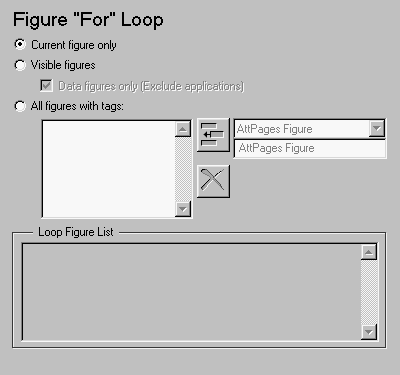
This is the Figure "For" Loop attribute page.
 Note:
Note:
To view a component attribute page in the Setup File Editor, select the component in the setup file outline on the left and click on the Options tab. If the component is not in the setup file outline, you must add it to the outline first. See Chapter 4 for a discussion on how to add a component to the outline.
Choosing Figure to Loop On
You can choose to loop on:
- Current figure only
- To include only the current figure in the report, select the Current figure only option.
- Visible figures
- To loop on all visible figures, select the Visible figures option. This option executes subcomponents for all figures that are currently open and visible.
- The Data figures only option is checked by default and excludes figures with
HandleVisibility = 'off' from the loop.
- All figures with tags:
- To loop on figures with certain tags, select the All figures with tags: option. When you are selecting a tag, all figures with that tag are included, regardless of whether the figure is visible or whether
HandleVisibility is 'on' or 'off'.
- The tag list box (located under the All figures with tags: option) shows the selected tags. To add a tag to the tag list box, select the tag from the drop box on the right and click on the Add button, shown below.

- The tag drop box shows a list of tags for figures that are open. If you want to add a tag that does not appear in the tag drop box, you can type in the tag. To type in a tag, select Enter tag in edit field and type in the name of the tag in the edit field below the tag drop box.
Loop Figure List
The Loop Figure List shows you what figures are looped on.
Note:
If your setup file generates new figures or changes existing figures, then the figures in the Loop Figure List will not be the figures that are actually reported on.
To see a figure in the Loop Figure List, click on the name of the figure. That figure becomes current and comes to the foreground.
If you click on the name of an invisible figure, the figure becomes visible for a moment.
Insert anything into report?
No.
Filename
chgfigloop
[ Previous | Help Desk | Next ]