
| Optimization Toolbox | Search Help Desk |
| lsqcurvefit | Examples See Also |
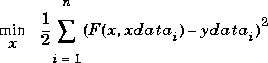
Solve nonlinear curve-fitting (data-fitting) problems in the least-squares sense. That is, given input data xdata, and the observed output ydata, find coefficients x that "best-fit" the equation F(x, xdata)
lsqcurvefit uses the same algorithm as lsqnonlin. Its purpose is to provide an interface designed specifically for data-fitting problems.
Syntax
x = lsqcurvefit(fun,x0,xdata,ydata)
x = lsqcurvefit(fun,x0,xdata,ydata,lb,ub)
x = lsqcurvefit(fun,x0,xdata,ydata,lb,ub,options)
x = lsqcurvefit(fun,x0,xdata,ydata,lb,ub,options,P1,P2,...)
[x,resnorm] = lsqcurvefit(...)
[x,resnorm,residual] = lsqcurvefit(...)
[x,resnorm,residual,exitflag] = lsqcurvefit(...)
[x,resnorm,residual,exitflag,output] = lsqcurvefit(...)
[x,resnorm,residual,exitflag,output,lambda] = lsqcurvefit(...)
[x,resnorm,residual,exitflag,output,lambda,jacobian] =
    lsqcurvefit(...)
Description
lsqcurvefit solves nonlinear data-fitting problems. lsqcurvefit requires a user-defined function to compute the vector-valued function F(x, xdata). The size of the vector returned by the user-defined function must be the same as the size of ydata.
x = lsqcurvefit(fun,x0,xdata,ydata)
starts at x0 and finds coefficients x to best fit the nonlinear function fun(x,xdata) to the data ydata (in the least-squares sense). ydata must be the same size as the vector (or matrix) F returned by fun.
x = lsqcurvefit(fun,x0,xdata,ydata,lb,ub)
defines a set of lower and upper bounds on the design variables, x, so that the solution is always in the range lb <= x <= ub.
x = lsqcurvefit(fun,x0,xdata,ydata,lb,ub,options)
minimizes with the optimization parameters specified in the structure options.
x = lsqcurvefit(fun,x0,xdata,ydata,lb,ub,options,P1,P2,...)
passes the problem-dependent parameters P1, P2, etc., directly to the function fun. Pass an empty matrix for options to use the default values for options.
[x,resnorm] = lsqcurvefit(...)
returns the value of the squared 2-norm of the residual at x: sum{(fun(x,xdata)-ydata).^2}.
[x,resnorm,residual] = lsqcurvefit(...)
returns the value of the residual, fun(x,xdata)-ydata, at the solution x.
[x,resnorm,residual,exitflag] = lsqcurvefit(...)
returns a value exitflag that describes the exit condition.
[x,resnorm,residual,exitflag,output] = lsqcurvefit(...)
returns a structure output that contains information about the optimization.
[x,resnorm,residual,exitflag,output,lambda] = lsqcurvefit(...)
returns a structure lambda whose fields contain the Lagrange multipliers at the solution x.
[x,resnorm,residual,exitflag,output,lambda,jacobian] =
returns the Jacobian of fun at the solution x.
Arguments
The arguments passed into the function are described in Table 1-1. The arguments returned by the function are described in Table 1-2. Details relevant tolsqcurvefit are included below for fun, options, exitflag, lambda, and output.fun |
The function to be minimized. fun takes a vector x and returns a vector F of the objective functions evaluated at x. You can specify fun to be an inline object with two input parameters x and xdata. For example,
f = ...
inline('x(1)*xdata.^2+x(2)*sin(xdata)','x','xdata');
Alternatively, fun can be a string containing the name of a function (an M-file, a built-in function, or a MEX-file). If fun='myfun' then the M-file function myfun.m would have the form
function F = myfun(x,xdata) F = ... % Compute function values at x |
If the Jacobian can also be computed and options.Jacobian is 'on', set by
options = optimset('Jacobian','on')then the function fun must return, in a second output argument, the Jacobian value J, a matrix, at x. Note that by checking the value of nargout the function can avoid computing J when fun is called with only one output argument (in the case where the optimization algorithm only needs the value of F but not J):
|
|
function [F,J] = myfun(x,xdata)
F = ...          % objective function values at x
if nargout > 1   % two output arguments
   J = ...   % Jacobian of the function evaluated at x
end
If fun returns a vector (matrix) of m components and x has length n, then the Jacobian J is an m-by-n matrix where J(i,j) is the partial derivative of F(i) with respect to x(j). (Note that the Jacobian J is the transpose of the gradient of F.)
|
|
options |
Optimization parameter options. You can set or change the values of these parameters using the optimset function. Some parameters apply to all algorithms, some are only relevant when using the large-scale algorithm, and others are only relevant when using the medium-scale algorithm.
We start by describing the LargeScale option since it states a preference for which algorithm to use. It is only a preference since certain conditions must be met to use the large-scale or medium-scale algorithm. For the large-scale algorithm, the nonlinear system of equations cannot be under-determined; that is, the number of equations (the number of elements of F returned by fun) must be at least as many as the length of x. Furthermore, only the large-scale algorithm handles bound constraints.
|
Parameters used by both the large-scale and medium-scale algorithms:
|
|
| Parameters used by the large-scale algorithm only: | |
|
|
exitflag |
Describes the exit condition: |
lambda |
A structure containing the Lagrange multipliers at the solution x (separated by constraint type):
|
output |
A structure whose fields contain information about the optimization:
|
Examples
Vectors of data xdata and ydata are of length n. You want to find coefficients x to find the best fit to the equation
F(x,xdata) = x(1)*xdata.^2 + x(2)*sin(xdata) + x(3)*xdata.^3, starting at the point x0 = [0.3, 0.4, 0.1].
First, write an M-file to return the value of F (F has n components):
Next, invoke an optimization routine:function F = myfun(x,xdata)F = x(1)*xdata.^2 + x(2)*sin(xdata) + x(3)*xdata.^3;
Note that at the time that% Assume you determined xdata and ydata experimentallyxdata = [3.6 7.7 9.3 4.1 8.6 2.8 1.3 7.9 10.0 5.4]; ydata = [16.5 150.6 263.1 24.7 208.5 9.9 2.7 163.9 325.0 54.3];x0 = [10, 10, 10]% Starting guess[x,resnorm] = lsqcurvefit('myfun',x0,xdata,ydata)
lsqcurvefit is called, xdata and ydata are assumed to exist and are vectors of the same size. They must be the same size because the value F returned by fun must be the same size as ydata.
After 33 function evaluations, this example gives the solution:
x =
0.2269    0.3385    0.3021
% residual or sum of squares
resnorm =
     6.2950
The residual is not zero because in this case there was some noise (experimental error) in the data.
Algorithm
Large-scale optimization. By defaultlsqcurvefit will choose the large-scale algorithm. This algorithm is a subspace trust region method and is based on the interior-reflective Newton method described in [5], [6]. Each iteration involves the approximate solution of a large linear system using the method of preconditioned conjugate gradients (PCG). See the trust-region and preconditioned conjugate gradient method descriptions in the Large-Scale Algorithms chapter.
Medium-scale optimization.
lsqcurvefit with options.LargeScale set to 'off' uses the Levenberg-Marquardt method with line-search [1], [2], [3]. Alternatively, a Gauss-Newton method [4] with line-search may be selected. The choice of algorithm is made by setting options.LevenbergMarquardt. Setting options.LevenbergMarquardt to 'off' (and options.LargeScale to 'off') selects the Gauss-Newton method, which is generally faster when the residual is small.
The default line search algorithm, i.e.,
is small.
The default line search algorithm, i.e., options.LineSearchType set to 'quadcubic', is a safeguarded mixed quadratic and cubic polynomial interpolation and extrapolation method. A safeguarded cubic polynomial method can be selected by setting options.LineSearchType to 'cubicpoly'. This method generally requires fewer function evaluations but more gradient evaluations. Thus, if gradients are being supplied and can be calculated inexpensively, the cubic polynomial line search method is preferable. The algorithms used are described fully in the Introduction to Algorithms chapter.
Diagnostics
Large-scale optimization. The large-scale code will not allow equal upper and lower bounds. For example iflb(2)==ub(2) then lsqlin gives the error
Equal upper and lower bounds not permitted.
(lsqcurvefit does not handle equality constraints, which is another way to formulate equal bounds. If equality constraints are present, use fmincon, fminimax, or fgoalattain for alternative formulations where equality constraints can be included.)
Limitations
The function to be minimized must be continuous.lsqcurvefit may only give local solutions.
lsqcurvefit only handles real variables (the user-defined function must only return real values). When x has complex variables, the variables must be split into real and imaginary parts.
Large-scale optimization.
The large-scale method for lsqcurvefit does not solve underdetermined systems: it requires that the number of equations, i.e., row dimension of F, be at least as great as the number of variables. In the underdetermined case, the medium-scale algorithm will be used instead. See Table 1-4 for more information on what problem formulations are covered and what information must be provided.
The preconditioner computation used in the preconditioned conjugate gradient part of the large-scale method forms JTJ (where J is the Jacobian matrix) before computing the preconditioner; therefore, a row of J with many nonzeros, which results in a nearly dense product JTJ, may lead to a costly solution process for large problems.
If components of x have no upper (or lower) bounds, then lsqcurvefit prefers that the corresponding components of ub (or lb) be set to inf (or -inf for lower bounds) as opposed to an arbitrary but very large positive (or negative for lower bounds) number.
Currently, if the analytical Jacobian is provided in fun, the options parameter DerivativeCheck cannot be used with the large-scale method to compare the analytic Jacobian to the finite-difference Jacobian. Instead, use the medium-scale method to check the derivatives with options parameter MaxIter set to zero iterations. Then run the problem with the large-scale method.
See Also
optimset, lsqlin, lsqnonlin, lsqnonneg, \
References
[1] Levenberg, K., "A Method for the Solution of Certain Problems in Least Squares," Quarterly Applied Math. 2, pp. 164-168, 1944. [2] Marquardt, D., "An Algorithm for Least-squares Estimation of Nonlinear Parameters," SIAM Journal Applied Math. Vol. 11, pp. 431-441, 1963. [3] More, J. J., "The Levenberg-Marquardt Algorithm: Implementation and Theory," Numerical Analysis, ed. G. A. Watson, Lecture Notes in Mathematics 630, Springer Verlag, pp. 105-116, 1977. [4] Dennis, J. E. Jr., "Nonlinear Least Squares," State of the Art in Numerical Analysis, ed. D. Jacobs, Academic Press, pp. 269-312, 1977. [5] Coleman, T.F. and Y. Li, "On the Convergence of Reflective Newton Methods for Large-Scale Nonlinear Minimization Subject to Bounds," Mathematical Programming, Vol. 67, Number 2, pp. 189-224, 1994. [6] Coleman, T.F. and Y. Li, "An Interior, Trust Region Approach for Nonlinear Minimization Subject to Bounds," SIAM Journal on Optimization, Vol. 6, pp. 418-445, 1996.