| Mapping Toolbox | Search Help Desk |
| imagem | Examples See Also |
Display regular matrix map as an image
Syntax
h = imagem(map,maplegend)
h = imagem(map,maplegend,PropertyName,PropertyValue,...)
Description
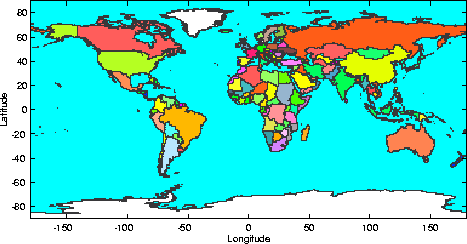
This command displays regular matrix maps as images and displays latitude and longitude axes. Because it is a matrix image, the resulting projection is equirectangular (Platte Carre in particular) and hence is not necessarily ideal as a final product. However,imagem is useful for quickly viewing matrix maps for content.
Note that imagem uses standard MATLAB axes, not map axes.
h = imagem(map,maplegend) displays the regular matrix map, map, as an image, as well as latitude and longitude scales. The map legend vector maplegend is also required. The object handle h can be returned.
h = imagem(map,maplegend,PropertyName,PropertyValue,...) allows the specification of property/value pairs to control the image object properties. Any property supported by the standard MATLAB command image except XData and YData can be altered. For a complete description of image properties, see image in the online MATLAB Function Reference.
Examples
load worldmtx
imagem(map,maplegend)
colormap(clrmap)
See Also
pcolorm |
Project a matrix map in the z = 0 plane |