| Mapping Toolbox | Search Help Desk |
| pcolorm | Examples See Also |
Project matrix map in the z = 0 plane
Syntax
h = pcolorm(map)
h = pcolorm(map,npts)
h = pcolorm(lat,lon,map)
h = pcolorm(lat,lon,map,PropertyName,PropertyValue,...)
Description
This command warps a matrix map to a graticule mesh, which itself is projected according to the map axes propertyMapProjection. The fineness, or resolution of this grid determines the quality of the projection and the speed of plotting it. There is no hard and fast rule for sufficient graticule resolution, but in general, cylindrical projections need very few graticules points in the longitudinal direction, while complex curve-generating projections require more.
h = pcolorm(map) projects the matrix map, map, on a graticule grid the size of map between the latitude and longitude limits of the current map axes. The handle h of the displayed surface can be returned.
h = pcolorm(map,npts) results in a graticule grid defined by npts, which is a two-element vector of the form [latitude-points longitude-points]. The default npts is [50 100].
h = pcolorm(lat,lon,map) allows three other methods of defining the graticule grid. If lat and lon are matrices, they represent the actual graticule vertices as might be returned by meshgrat. If vectors, they are the representative coordinates of the rows and columns, respectively, of such a grid. If they are two-element vectors, they are treated as latitude and longitude limits, and a graticule mesh the size of the default npts is calculated.
h = pcolorm(lat,lon,map,PropertyName,PropertyValue,...) allows the input of property/value pairs to control the surface object properties. Any property supported by the standard MATLAB command surface except XData, YData, and ZData can be altered in this manner.
Examples
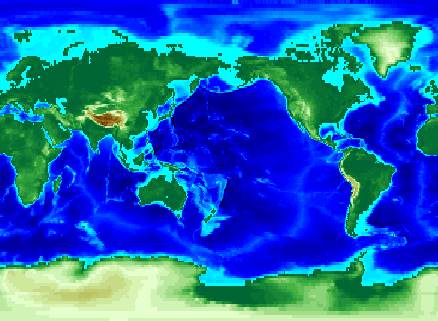
load topo
axesm miller
pcolorm(topo,[30 30])
demcmap(topo)
See Also
meshgrat |
Construct map graticule grid |
meshm |
Regular matrix map warped to projected graticule mesh |
surfacem |
Matrix map warped to projected graticule mesh |
surfm |
Matrix map projected a map axes |