| FixPt Relational Operator |
The
FixPt Relational Operator block is a masked S-function that performs a
comparison of its two inputs. The first input is converted the data type
of the second input prior to comparison.The operator
connecting the two inputs is selected with the Operator parameter
list. The supported relational operators are given below.
| Relational Operator |
Description |
| == |
TRUE if the first input is equal to the second
input |
| != |
TRUE if the first input is not equal to the second
input |
| < |
TRUE if the first input is less than the second
input |
| <= |
TRUE if the first input is less than or equal
to the second input |
| >= |
TRUE if the first input is greater than or equal
to the second input |
| > |
TRUE if the first input is greater than the second
input |
The output is specified with the Logical output
data type parameter. The output equals 1 for TRUE and 0 for FALSE. Note:
The Logical output data type selected
should represent zero exactly. Data types that satisfy this condition include
signed and unsigned integers and any floating-point data type.
The block icon displays the logic to be performed
on the inputs. For a description of how the block icon displays the output
data type, refer to "Block Icon Display".
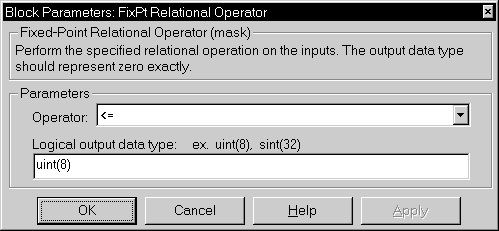
Parameters and Dialog Box
-
Operator
-
Relational operator used to compare the two inputs.
-
Logical output data type
-
Output data type. You should only use data types that can represent zero
exactly.
Conversions
The input with the smallest positive range is
converted to the data type of the other input offline using round-to-nearest
and saturation. This conversion is performed prior to comparison. Refer
to "Parameter Conversions" in the manual for more information about parameter
conversions.
Characteristics
| Input Port |
Any data type supported by the blockset |
| Output Port |
Any data type supported by the blockset that
can exactly represent zero |
| Direct Feedthrough |
Yes |
| Sample Time |
Inherited |
| Scalar Expansion |
Of inputs |
| States |
0 |
| Vectorized |
Yes |
[ Previous | Help
Desk | Next ]