20
5
4
| DSP Blockset | Search Help Desk |
| Counter | See Also |
Count up or down through a specified range of numbers.
Library
Switches and Counters, in General DSPDescription
The Counter block increments or decrements an internal counter each time it receives a trigger event at the top input port (Clk). A trigger event at the bottom input port (Rst) resets the counter to its initial state. The triggering event for both inputs is specified by the Count event pop-up menu, and can be one of the following:
Clk) port and enables the Sample time parameter. The block increments or decrements the counter at a constant interval specified by the Sample time parameter.
Clk input causes the block to increment the counter by one. The block continues incrementing the counter when triggered until the counter value reaches the upper count limit (e.g., 255 for an 8-bit counter). At the next trigger event, the block resets the counter to 0, and resumes incrementing the counter with the subsequent trigger event.
When the Count direction parameter is set to Down, a trigger event at the Clk input causes the block to decrement the counter by one. The block continues decrementing the counter when triggered until the counter value reaches 0. At the next trigger event, the block resets the counter to the upper count limit (e.g., 255 for an 8-bit counter), and resumes decrementing the counter with the subsequent trigger event.
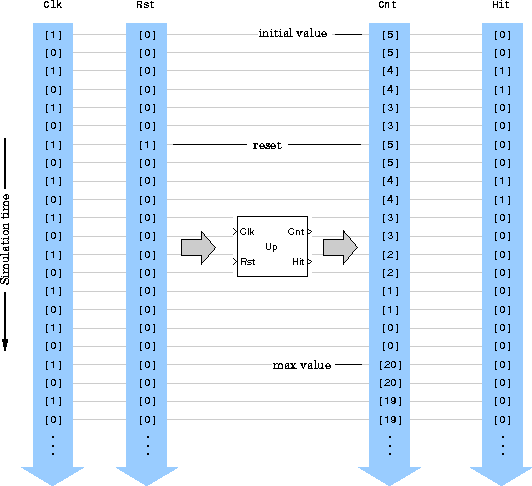
Between triggering events the block holds the output at its last value. The block resets the counter to its initial state when the trigger event specified in the Count event pop-up menu is received at the optional Rst input. When trigger events are received simultaneously at the Clk and Rst inputs, the block first resets the counter, and then increments or decrements appropriately. If you do not need to reset the counter during the simulation, you can remove the Rst port by deselecting the Reset input check box.
You can change the configuration of output ports on the block icon from the Output pop-up menu. Three options are available:
Cnt port, which outputs the current value of the counter.
Hit port. The Hit port outputs zeros while the value of the counter does not equal the Hit value parameter setting. When the counter value does equal the Hit value setting, the block outputs a 1 at the Hits port.
Clk input of the Counter block is driven by Simulink's Discrete Pulse Generator block. The Counter block settings are:
20
5
4
Frame-Based Operation
When the Frame-based inputs check box is selected, the block interprets each vector input as a frame of data from one channel. Multichannel inputs (i.e., frame matrices) are not accepted.
At each sample time it increments or decrements the counter by the number of trigger events contained in the frame. A trigger event that is split across two consecutive frames is counted in the frame that contains the conclusion of the event. When a trigger event is received at the Rst port, the block first resets the counter, and then increments or decrements the counter by the number of trigger events contained in the frame. The output (the block's count) is still a scalar with the same period as the input.
Clk port in free-running mode.
Dialog Box
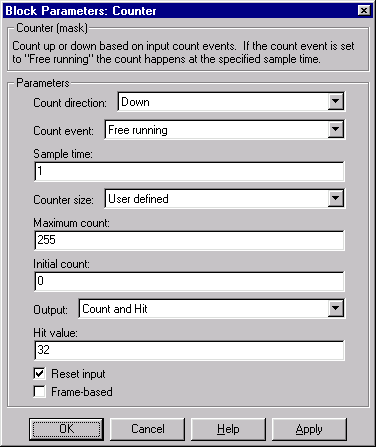

Clk or Rst ports, respectively). Free running disables the Clk port, and counts continuously with the period specified by the Sample time parameter.
Cnt, Hit, or both.
1 at the (optional) Hit output. This parameter is not tunable in Simulink's external mode.Rst input port.See Also
Edge Detector