| DSP Blockset | Search Help Desk |
| N-Sample Switch | See Also |
Switch between two inputs after a specified number of sample periods.
Library
Switches and Counters, in General DSPDescription
The N-Sample Switch block outputs the signal connected to the top input for the first N sample times after the simulation begins or the block is reset. Beginning at sample time N+1, the block outputs the signal connected to the bottom input until the next reset or the end of the simulation. The two inputs must be the same size except when one is a scalar, in which case the block expands the scalar to the size of the other input. The block resets the count to zero when a trigger signal is received at the optionalTrig port at any time during the simulation. Enable the Trig port by selecting the Reset input check box. The triggering event is specified by the Trigger type pop-up menu, and can be one of the following:
Dialog Box
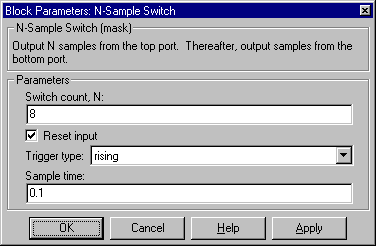
Trig input port when selected.Trig port that resets the block's counter.See Also
N-Sample Enable