| Data Acquisition Toolbox | Search Help Desk |
Engineering Unit Conversion
The Data Acquisition Toolbox provides you with a method for converting analog input signals into values which represent specific engineering units (Newtons, degrees Celsius, etc.). When specifying engineering units (EU), there are three aspects to consider:InputRange property is often expressed in terms of a device's gain and polarity. If you set InputRange to a particular value, then gain and/or polarity will change accordingly. For example, if an analog input subsystem has a built-in voltage range of 10 volts, and if InputRange is set to [0 10], then polarity is automatically set to unipolar, but gain is unchanged.
Example: Performing a Linear Conversion
Suppose your task is to measure acceleration with an accelerometer. The sensor can measure acceleration up to +-10g (1 g = 9.80 m/s/s) and this range produces an output voltage from -3 to 3 volts. In addition, assume that you will use the full range of the accelerometer and the gain and polarity of your data acquisition hardware can be configured to match the sensor's output range. Furthermore, you want to display the acquired data in units of g's. This application is illustrated in the figure below.
| Name |
Property |
Property Value |
| Sensor range | SensorRange
|
[-3 3]
|
| A/D range | InputRange
|
[-5 5]
|
| Units range | UnitsRange
|
[-10 10]
|
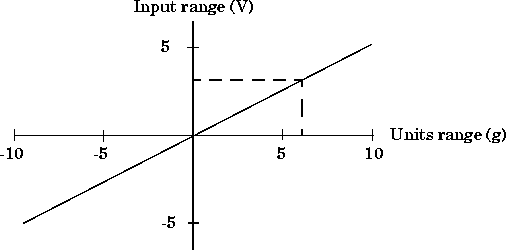
AI = analoginput('nidaq',1)
addchannel(AI, 1);
set(AI, 'SampleRate', 10000);
set(AI.Channel,'SensorRange', [-5 5]);
set(AI.Channel,'InputRange', [-5 5]);
set(AI.Channel,'UnitsRange', [-10 10]);
set(AI.Channel,'Units', 'g''s (1g = 9.80 m/s/s)');