| Data Acquisition Toolbox | Search Help Desk |
Microphone and Sound Card Types
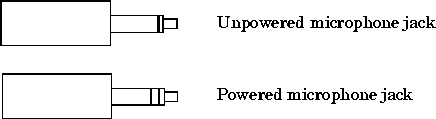
Your microphone will be one of two possible types: powered or unpowered. Powered microphones can be used only with Sound Blaster or Sound Blaster compatible microphone inputs. Unpowered microphones can be used with any sound card microphone input. Many laptops must use unpowered microphones since they do not have Sound Blaster compatible sound cards. As shown below, these two microphone types can be easily identified by their jacks.