
| Control System Toolbox | Search Help Desk |
| zpk | Examples See Also |
Specify zero-pole-gain models or convert LTI model to zero-pole-gain form
Syntax
sys = zpk(z,p,k)
sys = zpk(z,p,k,Ts)
sys = zpk(M)
sys = zpk(z,p,k,ltisys)

sys = zpk(z,p,k,'Property1',Value1,...,'PropertyN',ValueN)
sys = zpk(z,p,k,Ts,'Property1',Value1,...,'PropertyN',ValueN)

sys = zpk('s')
sys = zpk('z')

zsys = zpk(sys)
zsys = zpk(sys,'inv')    % for state-space sys only
Description
zpk
Creation of Zero-Pole-Gain Models
sys = zpk(z,p,k)
z, poles p, and gain(s) k. The output sys is a ZPK object storing the model data (see "LTI Objects" in the manual).
In the SISO case, z and p are the vectors of real or complex conjugate zeros and poles, and k is the real-valued scalar gain.
z or p to [] for systems without zeros or poles. These two vectors need not have equal length and the model need not be proper (that is, have an excess of poles).
You can also use rational expressions to create a ZPK model. To do so, use either:
s = zpk('s') to specify a ZPK model from a rational transfer function of the Laplace variable, s.
z = zpk('z',Ts) to specify a ZPK model with sample time Ts from a rational transfer function of the discrete-time variable, z.
s or z.
To create a MIMO zero-pole-gain model, specify the zeros, poles, and gain of each SISO entry of this model. In this case:
z and p are cell arrays of vectors with as many rows as outputs and as many columns as inputs, and k is a matrix with as many rows as outputs and as many columns as inputs.
z{i,j} and p{i,j} specify the zeros and poles of the transfer function from input j to output i.
k(i,j) specifies the (scalar) gain of the transfer function from input j to output i.
sys = zpk(z,p,k,Ts)
creates a discrete-time zero-pole-gain model with sample time Ts (in seconds). Set Ts = -1 or Ts = [] to leave the sample time unspecified. The input arguments z, p, k are as in the continuous-time case.
sys = zpk(M)
specifies a static gain M.
sys = zpk(z,p,k,ltisys)
creates a zero-pole-gain model with generic LTI properties inherited from the LTI model ltisys (including the sample time). See "Generic Properties" in the manual for an overview of generic LTI properties.
To create an array of ZPK models, use a for loop, or use multidimensional cell arrays for z and p, and a multidimensional array for k.
Any of the previous syntaxes can be followed by property name/property value pairs.
'PropertyName',PropertyValueEach pair specifies a particular LTI property of the model, for example, the input names or the input delay time. See
set entry and the example below for details. Note that
sys = zpk(z,p,k,'Property1',Value1,...,'PropertyN',ValueN)is a shortcut for the following sequence of commands.
sys = zpk(z,p,k)
set(sys,'Property1',Value1,...,'PropertyN',ValueN)
Zero-Pole-Gain Models as Rational Expressions in s or z
You can also use rational expressions to create a ZPK model. To do so, first type either:s = zpk('s') to specify a ZPK model using a rational function in the Laplace variable, s.
z = zpk('z',Ts) to specify a ZPK model with sample time Ts using a rational function in the discrete-time variable, z.
s or z by entering your transfer function as a rational expression in either s or z.
Conversion to Zero-Pole-Gain Form
zsys = zpk(sys)
converts an arbitrary LTI model sys to zero-pole-gain form. The output zsys is a ZPK object. By default, zpk uses zero to compute the zeros when converting from state-space to zero-pole-gain. Alternatively,
zsys = zpk(sys,'inv')uses inversion formulas for state-space models to compute the zeros. This algorithm is faster but less accurate for high-order models with low gain at
 .
.
Variable Selection
As for transfer functions, you can specify which variable to use in the display of zero-pole-gain models. Available choices include (default) and
  for continuous-time models, and
  (default),
  , or
, or  for discrete-time models. Reassign the
 'Variable' property to override the defaults. Changing the variable affects only the display of zero-pole-gain models.
Example
Example 1
Specify the following zero-pole-gain model.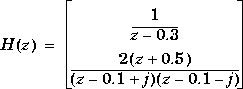
z = {[] ; -0.5}
p = {0.3 ; [0.1+i 0.1-i]}
k = [1 ; 2]
H = zpk(z,p,k,-1)    % unspecified sample time
Example 2
Convert the transfer functionh = tf([-10 20 0],[1 7 20 28 19 5])
Transfer function:
-10 s^2 + 20 s
----------------------------------------
s^5 + 7 s^4 + 20 s^3 + 28 s^2 + 19 s + 5
to zero-pole-gain form by typing
zpk(h)
Zero/pole/gain:
     -10 s (s-2)
----------------------
(s+1)^3 (s^2 + 4s + 5)
Example 3
Create a discrete-time ZPK model from a rational expression in the variablez, by typing
z = zpk('z',0.1);
H = (z+.1)*(z+.2)/(z^2+.6*z+.09)
Zero/pole/gain:
(z+0.1) (z+0.2)
---------------
   (z+0.3)^2

Sampling time: 0.1
Algorithm
zpk uses the MATLAB function roots to convert transfer functions and the functions zero and pole to convert state-space models.
See Also
frd Convert to frequency response data models
get Get properties of LTI models
set Set properties of LTI models
ss Convert to state-space models
tf Convert to TF transfer function models
zpkdata