Set or modify LTI model properties
Syntax
set(sys,'Property',Value)
set(sys,'Property1',Value1,'Property2',Value2,...)

set(sys,'Property')
set(sys)
Description
set
is used to set or modify the properties of an LTI model (see "LTI Properties" in the manual for background on LTI properties). Like its Handle Graphics counterpart, set uses property name/property value pairs to update property values.
set(sys,'Property',Value)
assigns the value Value to the property of the LTI model sys specified by the string 'Property'. This string can be the full property name (for example, 'UserData') or any unambiguous case-insensitive abbreviation (for example, 'user'). The specified property must be compatible with the model type. For example, if sys is a transfer function, Variable is a valid property but StateName is not (see "Model-Specific Properties" in the manual for details).
set(sys,'Property1',Value1,'Property2',Value2,...)
set(sys,'Property')
'Property'. See "Property Values" below for an overview of legitimate LTI property values.
set(sys)
displays all assignable properties of sys and their admissible values.
Example
Consider the SISO state-space model created by
sys = ss(1,2,3,4);
You can add an input delay of 0.1 second, label the input as torque, reset the  matrix to zero, and store its DC gain in the
 'Userdata' property by
set(sys,'inputd',0.1,'inputn','torque','d',0,'user',dcgain(sys))
Note that set does not require any output argument. Check the result with get by typing
get(sys)
        a = 1
        b = 2
        c = 3
        d = 0
        e = []
        Nx = 1
        StateName = {''}
        Ts = 0
        InputDelay = 0.1
        OutputDelay = 0
        ioDelayMatrix = 0
        InputName = {'torque'}
        OutputName = {''}
        InputGroup = {0x2 cell}
        OutputGroup = {0x2 cell}
        Notes = {}
        UserData = -6
Property Values
The following table lists the admissible values for each LTI property.  and
and  denotes the number of inputs and outputs of the underlying LTI model. For K-dimensional LTI arrays, let
  denote the array dimensions.
Table 1-15: LTI Properties
Property Name
|
Admissible Property Values
|
Ts
|
Note: Resetting the sample time property does not alter the model data. Use c2d, d2c, or d2d for discrete/continuous and discrete/discrete conversions.
|
ioDelayMatrix
|
Input/Output delays specified with
|
InputDelay
|
Input delays specified with
|
OutputDelay
|
Output delays specified with
|
Notes
|
String, array of strings, or cell array of strings
|
UserData
|
Arbitrary MATLAB variable
|
InputName
|
['rudder ' ; 'aileron']
|
OutputName
|
Same as InputName (with "input" replaced by "output")
|
InputGroup
|
Cell array. See "Input Groups and Output Groups" in the manual.
|
OutputGroup
|
Same as InputGroup
|
Table 1-16: State-Space Model Properties
Property Name
|
Admissible Property Values
|
StateName
|
Same as InputName (with Input replaced by State)
|
a, b, c, d, e
|
Real-valued state-space matrices (multidimensional arrays, in the case of LTI arrays) with compatible dimensions for the number of states, inputs, and outputs. See "The Size of LTI Array Data for SS Models" in the manual.
|
Nx
|
|
Table 1-17: TF Model Properties
Property Name
|
Admissible Property Values
|
num, den
|
|
Variable
|
|
Table 1-18: ZPK Model Properties
Property Name
|
Admissible Property Values
|
z, p
|
|
Variable
|
|
Table 1-19: FRD Model Properties
Property Name
|
Admissible Property Values
|
Frequency
|
Real-valued vector of length  -by-1, where -by-1, where  is the number of frequencies is the number of frequencies
|
Response
|
|
Units
|
String 'rad/s' (default), or 'Hz'
|
Remark
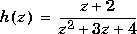
For discrete-time transfer functions, the convention used to represent the numerator and denominator depends on the choice of variable (see the tf entry for details). Like tf, the syntax for set changes to remain consistent with the choice of variable. For example, if the Variable property is set to 'z' (the default),
set(h,'num',[1 2],'den',[1 3 4])
produces the transfer function
However, if you change the Variable to 'z^-1' (or 'q') by
set(h,'Variable','z^-1'),
the same command
set(h,'num',[1 2],'den',[1 3 4])
now interprets the row vectors [1 2] and [1 3 4] as the polynomials  and
and  and produces:
Because the resulting transfer functions are different, make sure to use the convention consistent with your choice of variable.
and produces:
Because the resulting transfer functions are different, make sure to use the convention consistent with your choice of variable.
See Also
get frd
ss
tf
zpk
[ Previous | Help Desk | Next ]
 -by-
-by- matrix to specify independent delay times for each I/O pair
 -by-
-by-  -by-
-by-  -by-. . .-by-
 to specify different I/O delays for each model in an LTI array.
 or system has uniform input delay
 to specify independent delay times for each input channel
 -by-
-by-  -by-
-by-  -by-. . .-by-
 to specify different input delays for each model in an LTI array.

 to specify independent delay times for each output channel
 -by-
-by-  -by-
-by-  -by-. . .-by-
 to specify different output delays for each model in an LTI array.
 -by-
-by- -by-
-by- -dimensional array of integers when all of the models of an LTI array do not have the same number of states
 or
or  by default, and in ascending powers of
  when the
  -by-
-by- cell arrays of real-valued row vectors in the MIMO case, for example,
 -by-
-by- -by-
-by- -by-
-by- -by-
-by- -dimensional real-valued cell arrays for MIMO LTI arrays
 -by-
-by- cell arrays of vectors (entries are real-valued or in complex conjugate pairs) in MIMO case, for example,
  -by-
-by- -by-
-by- -by-
-by- -by-
-by- -dimensional cell arrays for MIMO LTI arrays
 -by-
-by- -by-
-by- -dimensional array of complex data for single LTI models
 -by-
-by- -by-
-by- -by-
-by- -by-
-by- -by-
-by- -dimensional array for LTI arrays