| Control System Toolbox | Search Help Desk |
| rltool | See Also |
Initialize the Root Locus Design GUI
Syntax
rltool
rltool(sys)
rltool(sys,comp)
rltool(sys,comp,LocationFlag,FeedbackSign)
Description
When invoked without input arguments,rltool initializes a new Root Locus Design GUI for interactive compensator design. This GUI allows you to design a single-input/single-output (SISO) compensator using root locus techniques.
The Root Locus Design GUI looks like this.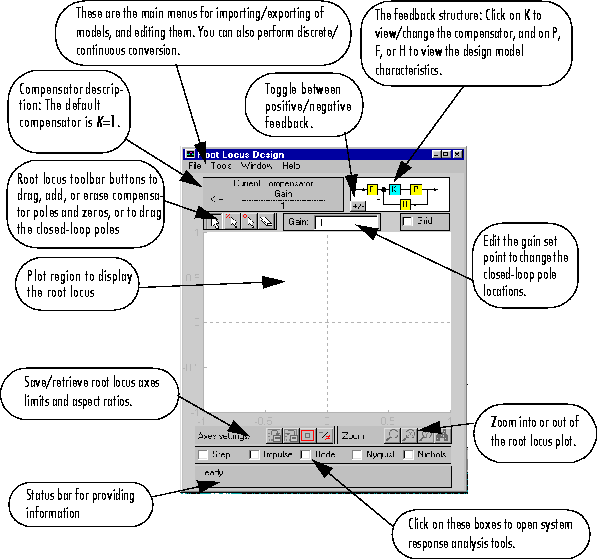
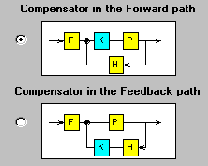
ss, tf, or zpk in your workspace or on your disk (or SISO LTI blocks contained in open or saved Simulink models) into F, P, and H. Otherwise, you can specify your design model by defining F, P, and H manually with LTI models created using ss, tf, or zpk in the text boxes provided on the Import Design Model window.
If sys is any SISO LTI object (created with ss, tf, or zpk) that exists in the
MATLAB workspace, rltool(sys)
sys.
rltool(sys,comp)
sys. In addition, the root locus compensator is initialized to comp, where comp is any SISO LTI object that exists in the MATLAB workspace.
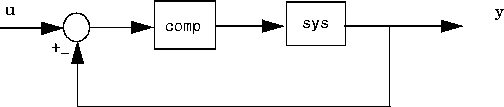
When either the plant, or both the plant and the compensator are provided as arguments to rltool, the root locus of the closed-loop poles and their locations for the current compensator gain are drawn on the Root Locus Design GUI. The closed-loop model is generated by placing the compensator (comp) and plant model (sys) in the forward loop of a negative unity feedback system, as shown in the diagram below.
sys. If you want to include F and H in the design model after loading rltool(sys) or rltool(sys,comp), select the Import Model menu item from the File menu of the Root Locus Design GUI to load F and H.
rltool(sys,comp,LocationFlag,FeedbackSign)
allows you to override the default compensator location and feedback sign. LocationFlag can be either 1 or 2:
LocationFlag = 1: Places the compensator in the forward path (this is the default)
LocationFlag = 2: Places the compensator in the feedback path
FeedbackSign can be either 1 or -1:
FeedbackSign = --1 for negative feedback (this is the default)
FeedbackSign = 1 for positive feedback
See Also
rlocus rlocfind