| Control System Toolbox | Search Help Desk |
| lsim | Examples See Also |
Simulate LTI model response to arbitrary inputs
Syntax
lsim(sys,u,t)
lsim(sys,u,t,x0)

lsim(sys1,sys2,...,sysN,u,t)
lsim(sys1,sys2,...,sysN,u,t,x0)
lsim(sys1,'PlotStyle1',...,sysN,'PlotStyleN',u,t)

[y,t,x] = lsim(sys,u,t,x0)
Description
lsim
simulates the (time) response of continuous or discrete linear systems to arbitrary inputs. When invoked without left-hand arguments, lsim plots the response on the screen.
lsim(sys,u,t)
produces a plot of the time response of the LTI model sys to the input time history t,u. The vector t specifies the time samples for the simulation and consists of regularly spaced time samples.
t = 0:dt:TfinalThe matrix
u must have as many rows as time samples (length(t)) and as many columns as system inputs. Each row u(i,:) specifies the input value(s) at the time sample t(i).
The LTI model sys can be continuous or discrete, SISO or MIMO. In discrete time, u must be sampled at the same rate as the system (t is then redundant and can be omitted or set to the empty matrix). In continuous time, the time sampling dt=t(2)-t(1) is used to discretize the continuous model. Automatic resampling is performed if dt is too large (undersampling) and may give rise to hidden oscillations (see "Algorithm").
lsim(sys,u,t,x0)
further specifies an initial condition x0 for the system states. This syntax applies only to state-space models.
Finally,
lsim(sys1,sys2,...,sysN,u,t)
t,u and plots these responses on a single figure. As with bode or plot, you can specify a particular color, linestyle, and/or marker for each system, for example,
lsim(sys1,'y:',sys2,'g--',u,t,x0)The multisystem behavior is similar to that of
bode or step.
When invoked with left-hand arguments,
[y,t] = lsim(sys,u,t)
[y,t,x] = lsim(sys,u,t)        % for state-space models only
[y,t,x] = lsim(sys,u,t,x0)     % with initial state
return the output response
y, the time vector t used for simulation, and the state trajectories x (for state-space models only). No plot is drawn on the screen. The matrix y has as many rows as time samples (length(t)) and as many columns as system outputs. The same holds for x with "outputs" replaced by states. Note that the output t may differ from the specified time vector when the input data is undersampled (see "Algorithm").
Example
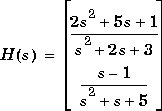
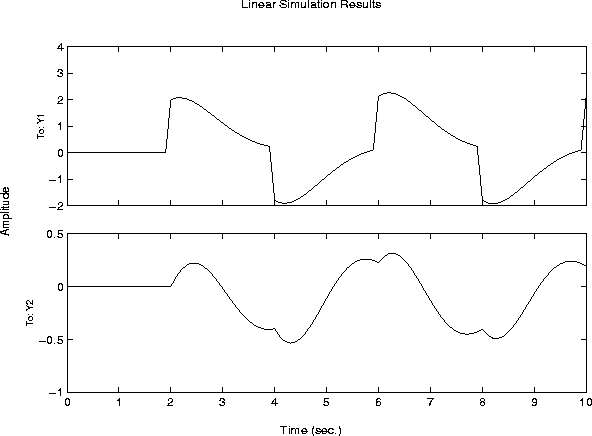
Simulate and plot the response of the system
gensig. Sample every 0.1 second during 10 seconds:
[u,t] = gensig('square',4,10,0.1)
Then simulate with lsim.
H = [tf([2 5 1],[1 2 3]) ; tf([1 -1],[1 1 5])]
lsim(H,u,t)
Algorithm
Discrete-time systems are simulated withltitr (state space) or filter (transfer function and zero-pole-gain).
Continuous-time systems are discretized with c2d using either the 'zoh' or 'foh' method ('foh' is used for smooth input signals and 'zoh' for discontinuous signals such as pulses or square waves). By default, the sampling period is set to the spacing dt between the user-supplied time samples t. However, if dt is not small enough to capture intersample behavior, lsim selects a smaller sampling period and resamples the input data using linear interpolation for smooth signals and zero-order hold for square signals. The time vector returned by lsim is then different from the specified t vector.
To illustrate why resampling is sometimes necessary, consider the second-order model

w2 = 62.83^2
h = tf(w2,[1 2 w2])

t = 0:0.1:5;             % vector of time samples
u = (rem(t,1)>=0.5);   % square wave values
lsim(h,u,t)
The response exhibits strong oscillations. Less obvious from this plot is the fact that
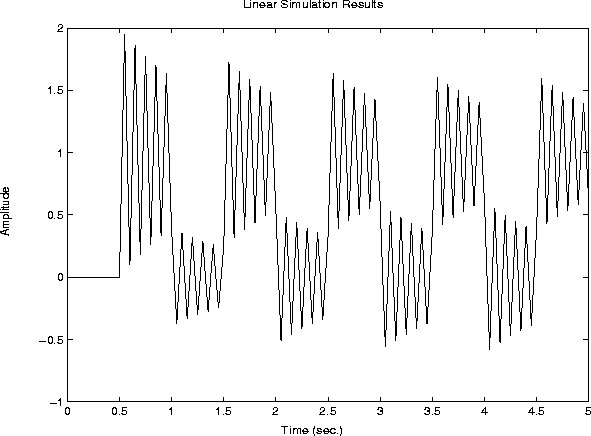
lsim has resampled the input to reveal the oscillatory behavior. To see this, discretize  using the sampling period 0.1 second (spacing in your
 t vector) and simulate the response of the discretized model:
hd = c2d(h,0.1)
lsim(hd,u,t)
The two responses look quite different. To clarify this discrepancy, superimpose the two plots by
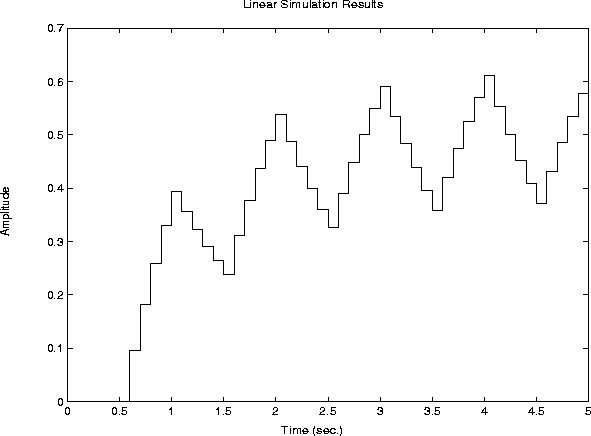
lsim(h,'b--',hd,'r-',u,t)The cause is now obvious:
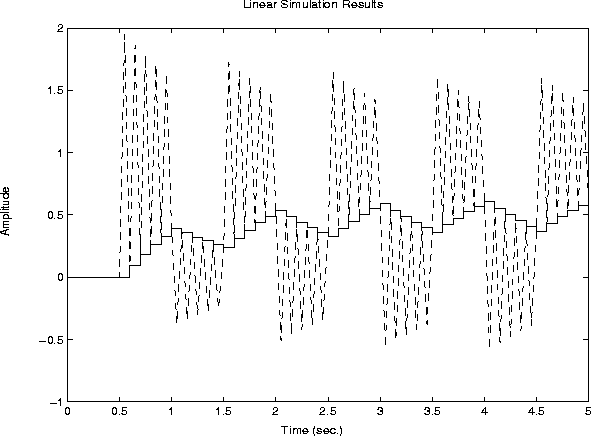
hd is undersampled and its response (solid line) masks the intersample oscillations of the continuous model  .
By comparing the suggested sampling
.
By comparing the suggested sampling dt=t(2)-t(1) against the system dynamics, lsim detects such undersampling and resamples the input to produce accurate continuous-time simulations.
See Also
gensig lsim
impulse
initial
ltiview LTI system viewer
step