| Control System Toolbox | Search Help Desk |
| initial | Examples See Also |
Compute the initial condition response of state-space models
Syntax
initial(sys,x0)
initial(sys,x0,t)

initial(sys1,sys2,...,sysN,x0)
initial(sys1,sys2,...,sysN,x0,t)
initial(sys1,'PlotStyle1',...,sysN,'PlotStyleN',x0)

[y,t,x] = initial(sys,x0)
Description
initial
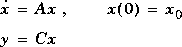
calculates the unforced response of a state-space model with an initial condition on the states.
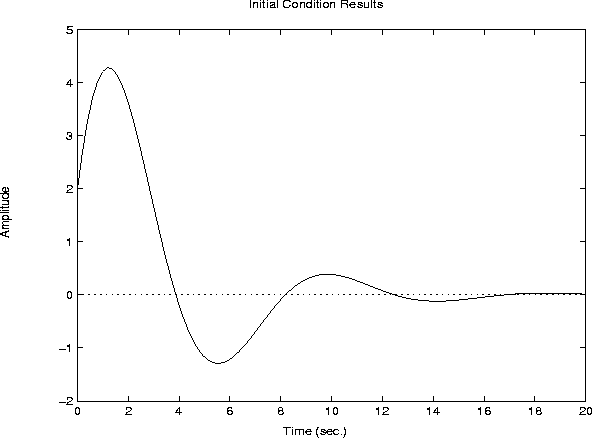
initial plots the initial condition response on the screen.
initial(sys,x0)
plots the response of sys to an initial condition x0 on the states. sys can be any state-space model (continuous or discrete, SISO or MIMO, with or without inputs). The duration of simulation is determined automatically to reflect adequately the response transients.
initial(sys,x0,t)
explicitly sets the simulation horizon. You can specify either a final time t = Tfinal (in seconds), or a vector of evenly spaced time samples of the form
t = 0:dt:TfinalFor discrete systems, the spacing
dt should match the sample period. For continuous systems, dt becomes the sample time of the discretized simulation model (see impulse), so make sure to choose dt small enough to capture transient phenomena.
To plot the initial condition responses of several LTI models on a single figure, use
(seeinitial(sys1,sys2,...,sysN,x0)initial(sys1,sys2,...,sysN,x0,t)
impulse for details).
When invoked with lefthand arguments,
[y,t,x] = initial(sys,x0)
[y,t,x] = initial(sys,x0,t)
return the output response
y, the time vector t used for simulation, and the state trajectories x. No plot is drawn on the screen. The array y has as many rows as time samples (length of t) and as many columns as outputs. Similarly, x has length(t) rows and as many columns as states.
Example
Plot the response of the state-space model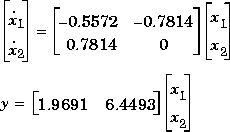

a = [-0.5572   -0.7814;0.7814  0];
c = [1.9691  6.4493];
x0 = [1 ; 0]

sys = ss(a,[],c,[]);
initial(sys,x0)
See Also
impulse lsim
ltiview LTI system viewer
step