| Upgrading from MATLAB 4 to MATLAB 5.0 | Search Help Desk |
Converting MATLAB 4 External Interface Programs to the MATLAB 5.0 Application Program Interface
MATLAB 4 External Interface programs, including MEX-files, MAT-file programs, and Engine programs may run without any modification on the MATLAB 5.0 Application Program Interface (API), or they may require modification and/or recompilation. The following pages and flowcharts describe how to determine which of these possibilities applies in your situation and how to choose the appropriate conversion technique.General Considerations
Non-ANSI C Compilers
MATLAB 4 let you compile External Interface programs with non-ANSI C compilers. MATLAB 5.0 API header files include strict prototyping of API functions and require an ANSI C compiler.MATLAB Character Strings
MATLAB 4 and MATLAB 5.0 represent string data in different ways.mxChar, a 16-bit unsigned integer data type. If the mxArray's class is mxCHAR_CLASS, the API treats each number in the mxArray as an element from the current character set. Character sets are platform specific.
External Interface programs that call the API routines mxGetString() and mxCreateString() to manipulate strings continue to work. All MEX-files that directly manipulate strings must be rewritten. MAT-file and Engine applications that directly manipulate strings need not be rewritten. However, to recompile these applications under MATLAB 5.0, any code that directly manipulates strings must be rewritten. We highly recommend that you use the API string access and creation routines to do this. To help in this endeavor, we have added a new C routine, mxCreateCharMatrixFromStrings(), in addition to mxGetString() and mxCreateString(), to make it easy to create two-dimensional string matrices.
MEX-File Argument Complexification
In MATLAB 4, if one argument to a MEX-function was complex, all arguments were passed as complex. This is not true in MATLAB 5.0. For example, consider a MEX-function,myeig(A,B,C), that calculates eigenvalues of three matrices. In MATLAB 4, if matrix A is complex, B and C are assumed to be complex matrices as well. In this instance, additional memory is allocated for the complex part of B and C, and initialized with zero values.
MATLAB 5.0 does not allocate this memory for you. If your MEX-file assumes argument complexification, you will have to rewrite your MEX-file. Each argument to a MEX-function needs to be tested with mxIsComplex() to guarantee that an argument indeed has a complex component.
Type Imputation by Process of Elimination
In MATLAB 4 the only way to determine if a matrix was a full, nonstring matrix was by a process of elimination. For example, if your code checked a variable and found that it was a full matrix (nonsparse), and was not a string, you could also assume that the variable was double-precision, floating-point and two-dimensional. In MATLAB 5.0, with the addition of several new data types and support for multidimensional data, this assumption is no longer valid.mxIs* routines and mxGetNumberOfDimensions() have been added to the C interface so that now you can explicitly check arguments for specific data types and shapes. mxIsDouble(), which always returned 1 in MATLAB 4, now correctly returns 1 only if the mxArray is of type double precision floating point. mxIsDouble() is available in C as well as Fortran. mxGetN() returns the total number of elements in dimensions 2-n, and therefore works correctly with multidimensional as well as two dimensional arguments.
Version 3.5 MEX-Files
MEX-files generated under MATLAB 4 using the-v3.5 switch to the cmex or fmex script are no longer supported and must be rewritten. Refer to both the MATLAB 4 External Interface Guide for information on upgrading to the MATLAB 4 syntax and the section later in this document on recoding for MATLAB 5.0 compliance.
Simulink
By design, Simulink S-functions written in C must be recompiled under the latest version of Simulink. The code is source compatible, but the binary must be recompiled. If you attempt to run a Simulink 1.3 C S -function under Simulink 2.1, you get an appropriate warning message. Simulink S-functions written in Fortran do not have this restriction.Fortran MEX-File Considerations
The MATLAB Fortran API has not changed from MATLAB 4 to MATLAB 5.0. However, Fortranmex users on Windows and the Sun4 must recompile their applications, using the mex script for programs that call mxCreateString() or mxGetString(). Only these platforms, which statically link in the Fortran interface, are affected. No recompilation is required on other platforms.
Rebuilding MEX-Files Loaded in Memory
In MATLAB 4, you could executecmex or fmex from within MATLAB by using the ! command or execute in another window. These methods are no longer supported with MATLAB 5.0. However, the M-file that builds MEX-files, mex.m, is available on all platforms and can safely rebuild loaded MEX-files by unloading them before proceeding with the build. The interface provided by the M-file is identical to the external mex script.
Default MEX-File Optimization
In MATLAB 4 MEX-files by default were built with no optimization flags passed to the compiler. In MATLAB 5.0 the default is to optimize MEX-files. See the MATLAB Application Program Interface Guide for more information.Debugging MEX-Files
The-debug switch to cmex/fmex is no longer supported. Instead, on all platforms, MATLAB 5.0 supports MEX-file debugging from within a MATLAB session. (See the debugging sections of the MATLAB Application Program Interface Guide for more details). In addition, the mex script has been enhanced with the -argcheck switch. That switch provides a way for C mex users to generate code to check input and output arguments at runtime and issue appropriate error messages if invalid data is detected.
MAT-File External Applications
MAT-file external applications built under MATLAB 4 will continue to work under MATLAB 5.0. Note that the MAT-file format has changed between MATLAB 4 and MATLAB 5.0. Although MATLAB will be able to read MATLAB 4 MAT-files generated by a stand-alone program, stand-alone programs will not be able to read MAT-files in a MATLAB 5.0 format. You can generate MATLAB 4 MAT-files from MATLAB 5.0 by specifically passing the-v4 switch to the save command.
Windows Considerations
MEX-files are generated under MATLAB 5.0 as 32-bit DLLs. Thecmex and fmex batch files have been superseded by mex (a PERL script) and a set of compiler-specific option files. These compilers are fully supported for creating MEX or stand-alone applications through MathWorks-supplied option files:
UNIX Considerations
Thecmex and fmex Bourne shell scripts for building MEX-files have been superseded by mex, also a Bourne shell script, that sources an options file, mexopts.sh for all platform compiler-specific information. The options file contains all the pertinent compiler and linker switches for building ANSI C and Fortran MEX-file applications. The .mexrc.sh file is no longer supported and must be converted to the new format. The mexdebug MATLAB command that allows UNIX users to debug their MEX-files while MATLAB is running has been changed to dbmex. The behavior of dbmex under MATLAB 5.0 is identical to mexdebug under MATLAB 4.
See "Fortran Considerations" above for Sun4-specific restrictions on creating and accessing MATLAB character strings.
You can use your existing UNIX Engine and MAT-file binary files unmodified; no recompilation is necessary. Note that MATLAB 4 Engine programs have no access to new MATLAB 5.0 data types. If you try to invoke engGetMatrix(ep,my_variable), and my_variable is a cell array, structure array, object, etc., the operation automatically fails.
Conversion
Rebuilding MEX-Files
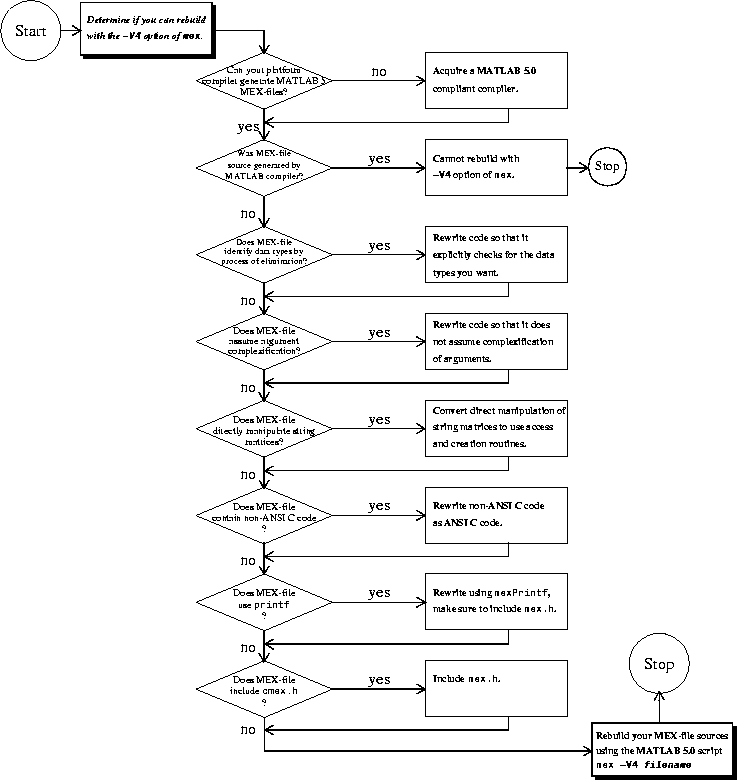
The simplest strategy for converting C MEX-file programs is to rebuild them with the special-V4 option of mex. This option uses mex to define a macro V4_COMPAT that supports MATLAB 4 syntax and function calls. Therefore, any ANSI C MEX-file source code that compiled cleanly under MATLAB 4 should compile cleanly with the -V4 option. The resulting MEX-file should run under MATLAB 5.0 just as it ran under MATLAB 4. For example, given C MEX-file MATLAB 4 source code in file MyEig.c, recompiling under UNIX with
mex -V4 myeig.cyields a MEX-file that MATLAB 5.0 can execute. It is also possible to use
cmex and fmex for compiling C and Fortran source code, but both of these functions simply call mex.
The obvious advantage to the -V4 strategy is that it requires very little work on your part. However, this strategy provides only a temporary solution to the conversion problem; there is no guarantee that future releases of MATLAB will continue to support the -V4 option. If you have the time, recoding for Rebuilding Stand-Alone MAT-File and Engine Programs
If your source code is ANSI compliant, you can recompile your source without modification by using the compiler flag -DV4_COMPAT. This allows you to avoid recoding, such as rewriting obsolete function calls as their MATLAB 5.0 equivalents. However, the resulting program will have the same restrictions as existing binary files.
See the MATLAB Application Program Interface Guide for instructions on compiling stand-alone programs in MATLAB 5.0.
MEX-File Conversion Flowcharts
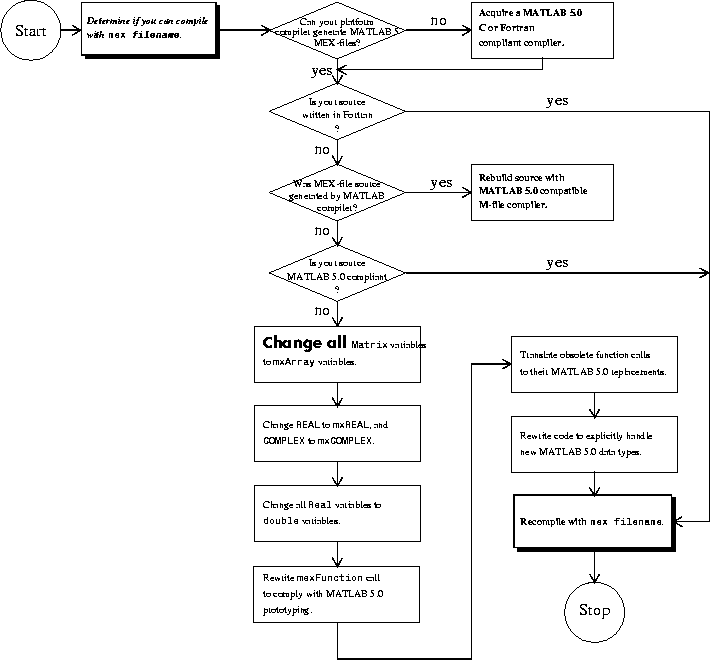
The flowcharts below help you determine what steps you should take to run your MATLAB 4 MEX-files under MATLAB 5.0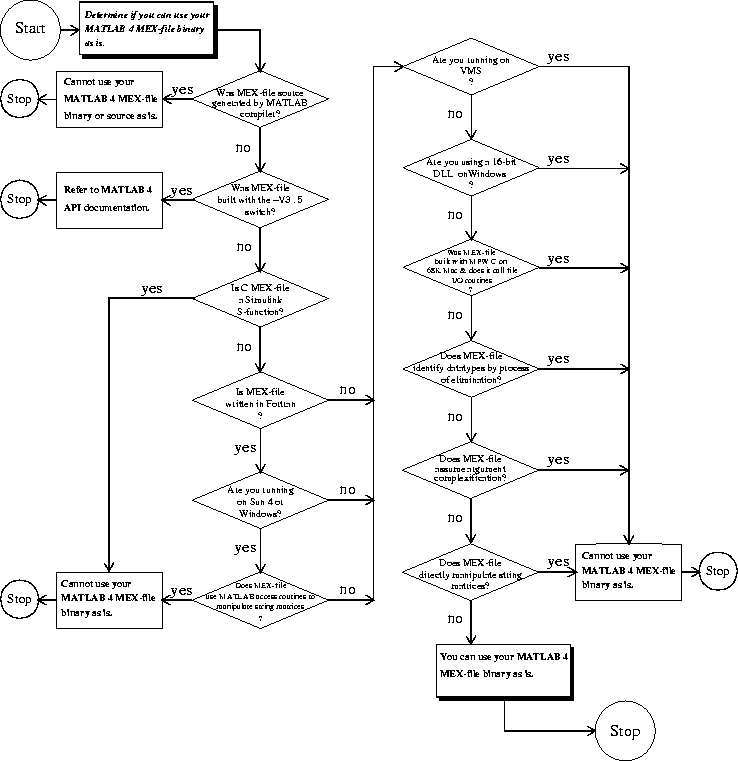
Recoding C Code for MATLAB 5.0 Compliance
Recoding your MATLAB 4 C code for MATLAB 5.0 compliance involves:Matrix variables to mxArray variables.
The MATLAB 4 Matrix data type is obsolete; you must change all Matrix variables to mxArray variables. For example, the mxCreateSparse function returns a Matrix pointer in MATLAB 4:
Matrix *MySparse;
MySparse = mxCreateSparse(10,10,110,REAL);
To be MATLAB 5.0 compliant, change the code to:
mxArray *MySparse;
MySparse = mxCreateSparse(10,10,110,mxREAL);
The function prototype of almost every MATLAB 4 function is different in MATLAB 5.0. The two primary prototype changes are
All Matrix arguments are now mxArray arguments.
Pointers to read only data are now declared as const *.
mexFunction to take a constant mxArray * as a fourth argument.
Changing REAL to mxREAL and COMPLEX to mxCOMPLEX.
In any function that requires the specification of real or complex data types, instead of REAL and COMPLEX, use mxREAL and mxCOMPLEX. For example, in MATLAB 4 you would write
mxCreateSparse(m,n,nzmax,REAL);
to create an m-by-n sparse matrix with nzmax nonzero real elements. In MATLAB 5.0, the correct syntax for this same function is:
mxCreateSparse(m,n,nzmax,mxREAL);
A number of functions have become obsolete. However, MATLAB 5.0 offers replacements for nearly all obsolete functions.
You should explicitly check the data type of your input arguments to ensure that you have what you want.