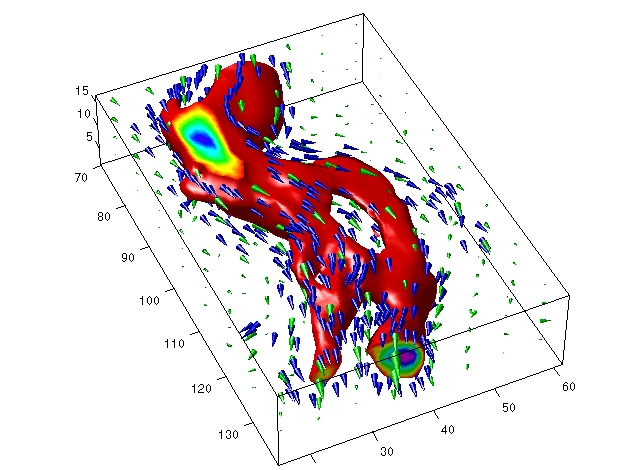
Vector Data Displayed with Cone Plots
This example plots the velocity vector cones for the wind data. The graph produced employs a number of visualization techniques:
Create an Isosurface
Displaying an isosurface within the rectangular space of the data provides a visual context for the cone plot. Creating the isosurface requires a number of steps:
load wind
wind_speed = sqrt(u.^2 + v.^2 + w.^2);
hiso = patch(isosurface(x,y,z,wind_speed,40));
isonormals(x,y,z,wind_speed,hiso)
set(hiso,'FaceColor','red','EdgeColor','none');
Adding Isocaps to the Isosurface
Isocaps are similar to slice planes in that they show a cross section of the volume. They are designed to be the end caps of isosurfaces. Using interpolated face color on an isocap causes a mapping of data value to color in the current colormap. To create isocaps for the isosurface, define them at the same isovalue (isocaps, patch, colormap).
hcap = patch(isocaps(x,y,z,wind_speed,40),...
    'FaceColor','interp',...
    'EdgeColor','none');
colormap hsv
Create First Set of Cones
daspect([1,1,1]);
[f verts] = reducepatch(isosurface(x,y,z,wind_speed,30),0.07);
h1 = coneplot(x,y,z,u,v,w,verts(:,1),verts(:,2),verts(:,3),3);
set(h1,'FaceColor','blue','EdgeColor','none');
Create Second Set of Cones
xrange = linspace(min(x(:)),max(x(:)),10);
yrange = linspace(min(y(:)),max(y(:)),10);
zrange = 3:4:15;
[cx,cy,cz] = meshgrid(xrange,yrange,zrange);
h2 = coneplot(x,y,z,u,v,w,cx,cy,cz,2);
set(h2,'FaceColor','green','EdgeColor','none');
Define the View
axis tight
box on
camproj perspective
camzoom(1.25)
view(65,45)
Add Lighting
Add a light source and use Phong lighting for the smoothest lighting of the isosurface. Increase the strength of the background lighting on the isocaps to make them brighter (camlight, lighting, AmbientStrength).
camlight(-45,45)
lighting phong
set(hcap,'AmbientStrength',.6)
[ Previous | Help Desk | Next ]