Interactive Plotting
The ginput function enables you to use the mouse or the arrow keys to select points to plot. ginput returns the coordinates of the pointer's position; either the current position or the position when a mouse button or key is pressed. See the ginput function in the online MATLAB Function Reference for more information on this function.
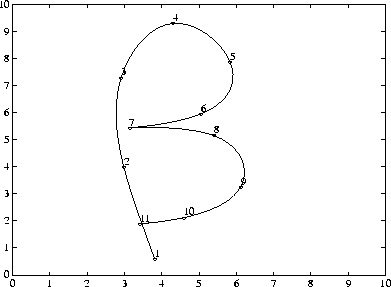
This example illustrates the use of ginput with the spline function to create a curve by interpolating in two dimensions.
First, select a sequence of points, [x,y], in the plane with ginput. Then pass two, one-dimensional splines through the points, evaluating them with a spacing 1/10th of the original spacing.axis([0 10 0 10])
hold on
% Initially, the list of points is empty.
x = [];
y = [];
n = 0;
% Loop, picking up the points.
disp('Left mouse button picks points.')
disp('Right mouse button picks last point.')
but = 1;
while but == 1
[xi,yi,but] = ginput(1);
plot(xi,yi,'go')
n = n+1;
x(n,1) = xi;
y(n,1) = yi;
end
% Interpolate with two splines and finer spacing.
t = 1:n;
ts = 1: 0.1: n;
xs = spline(t,x,ts);
ys = spline(t,y,ts);
% Plot the interpolated curve.
plot(xs,ys,'c-');
hold off
This plot shows some typical output.
[ Previous | Help Desk | Next ]