Displaying Contours in Polar Coordinates
You can contour data defined in the polar coordinate system. As an example, set up a grid in polar coordinates and convert the coordinates to Cartesian coordinates,
[th,r] = meshgrid((0:5:360)*pi/180,0:.05:1);
[X,Y] = pol2cart(th,r);
Then, generate the complex matrix Z on the interior of the unit circle,
Z = X+i*Y;
X, Y, and Z are points inside the circle.
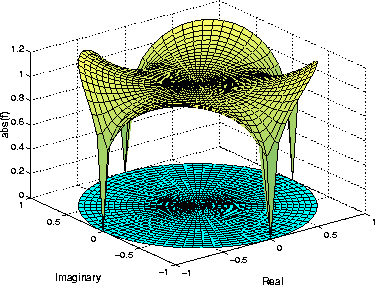
Create and display a surface of the function  .
.
f = (Z.^4-1).^(1/4);
surf(X,Y,abs(f))
Display the unit circle beneath the surface using the statements:
hold on
surf(X,Y,zeros(size(X)))
hold off
Labeling the Graph
These statements add labels:
xlabel('Real','FontSize',14);
ylabel('Imaginary','FontSize',14);
zlabel('abs(f)','FontSize',14);
Contours in Cartesian Coordinates
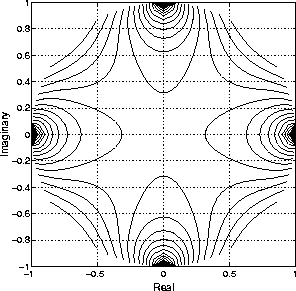
These statements display a contour of the surface in Cartesian coordinates and label the x- and y-axis:
contour(X,Y,abs(f),30)
axis equal
xlabel('Real','FontSize',14);
ylabel('Imaginary','FontSize',14);
Contours on a Polar Axis
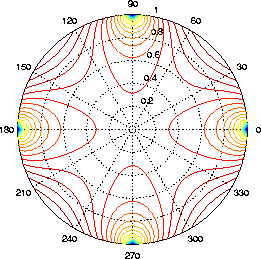
You can also display the contour within a polar axes. Create a polar axes using the polar function, and then delete the line specified with polar.
h = polar([0 2*pi], [0 1]);
delete(h)
With hold on, display the contour on the polar grid.
hold on
contour(X,Y,abs(f),30)
[ Previous | Help Desk | Next ]