Example - Importing a Bitmap Graphic
This example illustrates how to export a MATLAB graphic to a TIFF file that has a specified size and resolution. TIFF is a bitmapped format, therefore:
The best approach is to specify the desired figure size in MATLAB and to create the TIFF file at a resolution greater than screen resolution.
Size and Resolution Considerations
The size of the bitmap file is affected by both the size of the graphic and the resolution. Therefore, printing to a smaller paper position size results in a smaller file. You may need to determine your resolution requirements through experimentation. However, the default resolution of 150 dpi is probably adequate for typical laser-printer output. If you are preparing graphics for high quality printing, such as a text book or color brochures, you may want to use 200 or 300 dpi.
Background Information
These sections provide relevant background information for this example:
The Figure
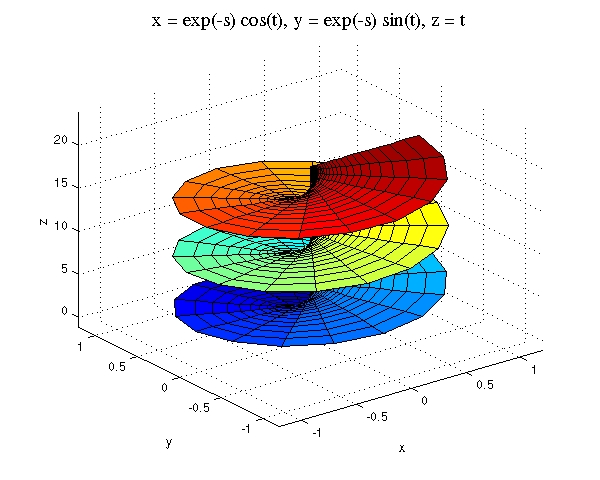
This example uses the ezsurf function to evaluate a mathematical expression.
ezsurf('exp(-s)*cos(t)','exp(-s)*sin(t)','t',[0,8,0,6*pi])
Increasing Edge Line Width
To prevent the edges of the surface faces from appearing broken in the bitmapped image, increase the line width to 1 point from the default of .5 (findobj, LineWidth).
h = findobj('Type','surface');
set(h,'LineWidth',1)
Adjusting Fonts
To create a desired presentation in the printed document, this example changes the font size and the font type used in the title.
set(gca,'FontSize',8)
set(get(gca,'Xlabel'),'FontSize',8)
set(get(gca,'Ylabel'),'FontSize',8)
set(get(gca,'Zlabel'),'FontSize',8)
set(get(gca,'Title'),'FontSize',12,'FontName','times')
The following picture illustrates the results.
Specifying the Figure Size in Your Document
This example creates a figure in the word processor application that is five inches wide and four inches tall by setting the PaperPosition property from the Page Setup dialog box. Also, to preserve the axis tick marks spacing used in the original figure, check the Match Axes Limits and Ticks option in the Limits section of the dialog box. See a picture of the dialog box with these settings in the previous example.
Export the Figure to a File
To apply the Page Setup dialog box settings, click OK and return to the MATLAB command window. Issue the print command to create a TIFF file with a resolution of 200 dpi.
print -dtiff -r200 filename
MATLAB adds the .tif extension to the file name specified: filename.tif.
You can now import the file into the word processor application. For example, in Microsoft Word, insert a frame and then insert the picture into the frame. Avoid scaling or using the Word picture editor once the graphic is imported.
[ Previous | Help Desk | Next ]