Handle Graphics
Handle Graphics is an object-oriented graphics system that provides the components necessary to create computer graphics. It supports drawing commands to create lines, text, meshes, and polygons as well as interactive devices such as menus, pushbuttons, and dialog boxes.
With Handle Graphics, you can directly manipulate the lines, surfaces, and other graphics elements that MATLAB's high-level routines use to produce various types of graphs. You can use Handle Graphics from the MATLAB command line to modify the display or in M-files to create customized graphics functions.
Object Hierarchy
Handle Graphics objects are the basic drawing elements used by MATLAB to display data and to create graphical user interfaces (GUIs). Each instance of an object is associated with a unique identifier called a handle. Using this handle, you can manipulate the characteristics (called object properties) of an existing graphics object. You can also specify values for properties when you create a graphics object.
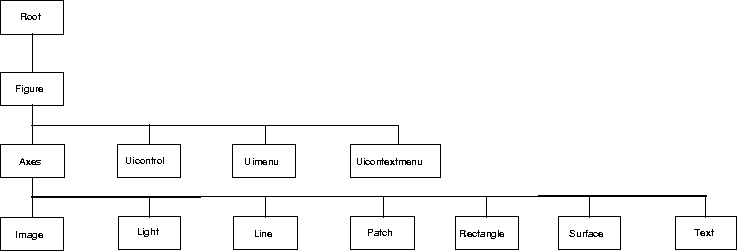
These objects are organized into a tree-structured hierarchy.
The hierarchical nature of Handle Graphics is based on the interdependencies of the various graphics objects. For example, to draw a line object, MATLAB needs an axes object to orient and provide a frame of reference to the line. The axes, in turn, needs a figure window to display the line.
[ Previous | Help Desk | Next ]