| Symbolic Math Toolbox | Search Help Desk |
| ezcontour | Examples See Also |
Syntax
ezcontour(f)
ezcontour(f,domain)
ezcontour(...,n)
Description
ezcontour(f) plots the contour lines of f(x,y), where f is a symbolic expression that represents a mathematical function of two variables, such as x and y.
The function f is plotted over the default domain -2 < x < 2, -2 < y < 2. MATLAB chooses the computational grid according to the amount of variation that occurs; if the function f is not defined (singular) for points on the grid, then these points are not plotted.
ezcontour(f,domain) plots f(x,y) over the specified domain. domain can be either a 4-by-1 vector [xmin, xmax, ymin, ymax] or a 2-by-1 vector [min, max] (where, min < x < max, min < y < max).
If f is a function of the variables u and v (rather than x and y), then the domain endpoints umin, umax, vmin, and vmax are sorted alphabetically. Thus, ezcontour(u^2 - v^3,[0,1],[3,6]) plots the contour lines for u2 - v3 overezcontour(...,n) plots f over the default domain using an n-by-n grid. The default value for n is 60.
ezcontour automatically adds a title and axis labels.
Examples
The following mathematical expression defines a function of two variables, x and y:
ezcontour requires a sym argument that expresses this function using MATLAB syntax to represent exponents, natural logs, etc. This function is represented by the symbolic expression:
syms x y
f = 3*(1-x)^2*exp(-(x^2)-(y+1)^2) ...
        - 10*(x/5 - x^3 - y^5)*exp(-x^2-y^2) ...
        - 1/3*exp(-(x+1)^2 - y^2);
For convenience, this expression is written on three lines.
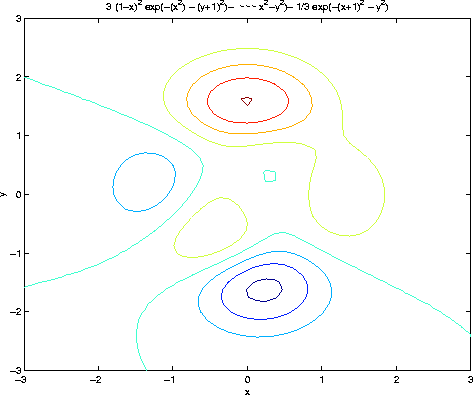
Pass the sym f to ezcontour along with a domain ranging from -3 to 3 and specify a computational grid of 49-by-49:
ezcontour(f,[-3,3],49)In this particular case, the title is too long to fit at the top of the graph so MATLAB abbreviates the string.
See Also
contour, ezcontourf, ezmesh, ezmeshc, ezplot, ezplot3, ezpolar, ezsurf, ezsurfc