| Statistics Toolbox | Search Help Desk |
| gname | Examples See Also |
Label plotted points with their case names or case number.
Syntax
gname('cases')
gname
h = gname('cases',line_handle)
Description
gname('cases') displays the graph window, puts up a cross-hair, and waits for a mouse button or keyboard key to be pressed. Position the cross-hair with the mouse and click once near each point that you want to label. When you are done, press the Return or Enter key and the labels will appear at each point that you clicked. 'cases' is a string matrix. Each row is the case name of a data point.
gname with no arguments labels each case with its case number.
h = gname(cases,line_handle) returns a vector of handles to the text objects on the plot. Use the scalar, line_handle, to identify the correct line if there is more than one line object on the plot.
Example
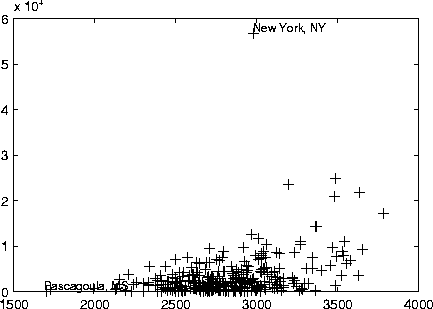
Let's use the city ratings datasets to find out which cities are the best and worst for education and the arts.load cities education = ratings(:,6); arts = ratings(:,7); plot(education,arts,'+') gname(names)
See Also
gtext