| Statistics Toolbox | Search Help Desk |
| fsurfht | Examples |
Interactive contour plot of a function.
Syntax
fsurfht('fun',xlims,ylims)
fsurfht('fun',xlims,ylims,p1,p2,p3,p4,p5)
Description
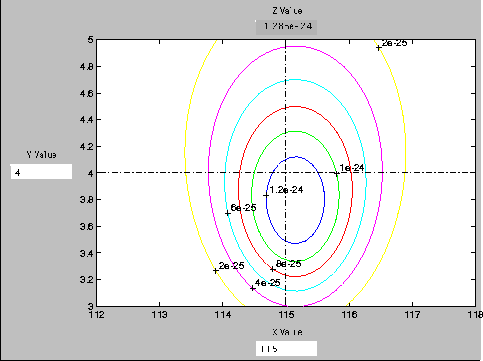
fsurfht('fun',xlims,ylims) is an interactive contour plot of the function specified by the text variable fun. The x-axis limits are specified by xlims = [xmin xmax] and the y-axis limits specified by ylims. fsurfht('fun',xlims,ylims,p1,p2,p3,p4,p5) allows for five optional parameters that you can supply to the function 'fun'. The first two arguments of fun are the x-axis variable and y-axis variable, respectively. There are vertical and horizontal reference lines on the plot whose intersection defines the current x-value and y-value. You can drag these dotted white reference lines and watch the calculated z-values (at the top of the plot) update simultaneously. Alternatively, you can get a specific z-value by typing the x-value and y-value into editable text fields on the x-axis and y-axis respectively.Example
Plot the Gaussian likelihood function for the gas.mat data.load gas
function z = gauslike(mu,sigma,p1)
n = length(p1);
z = ones(size(mu));
for i = 1:n
z = z .* (normpdf(p1(i),mu,sigma));
end
gauslike calls normpdf treating the data sample as fixed and the parameters µ and  as variables. Assume that the gas prices are normally distributed and plot the likelihood surface of the sample.
fsurfht('gauslike',[112 118],[3 5],price1)
The sample mean is the x-value at the maximum, but the sample standard deviation is not the y-value at the maximum.
mumax = mean(price1)

mumax =

  115.1500

sigmamax = std(price1)*sqrt(19/20)

sigmamax =

    3.7719