| Using Stateflow | Search Help Desk |
Implicit Events
Stateflow defines and triggers the following events that typically occur whenever a chart executes:Referencing Implicit Events
Action expressions can use the following syntax to reference implicit events.event(object)where
event is the name of the implicit event and object is the state or datum in which the event occurred. Valid implicit event names (and their shortcuts) are enter (en), exit (ex), and change (chg). If more than one object has the same name, the event reference must qualify the object's name with that of its ancestor. The following are some examples of valid implicit event references.
enter(switch_on)
en(switch_on)
change(engine.rpm)
Example
This example illustrates use of an implicitenter event.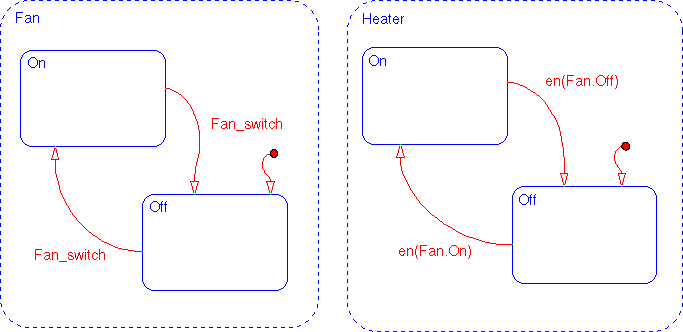
Fan and Heater are parallel (AND) superstates. By default, the first time the Stateflow diagram is awakened by an event, the states Fan.Off and Heater.Off become active. The first time event Fan_switch occurs, the transition from Fan.Off to Fan.On occurs. When Fan.On's entry action executes, an implicit local event is broadcast (i.e., en(Fan.On) == 1). This event broadcast triggers the transition from Heater.Off to Heater.On (triggered by the condition en(Fan.On). Similarly, when the system transitions from Fan.On to Fan.Off and the implicit local event Fan.Off is broadcast, the transition from Heater.On to Heater.Off is triggered.