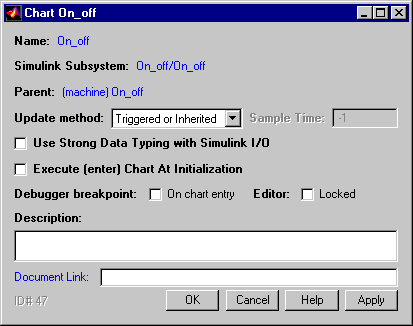
Field
|
Description
|
Name
|
Stateflow diagram name; read-only; click on this hypertext link to bring the chart to the foreground.
|
Simulink Subsystem
|
Simulink subsystem name; read-only; click on this hypertext link to bring the Simulink subsystem to the foreground.
|
Parent
|
Parent name; read-only; click on this hypertext link to display the parent's property dialog box.
|
Update method
|
Choose from Triggered or Inherited, Sampled, or Continuous.
|
Sample Time
|
If Update method is Sampled, enter a sample time.
|
Debugger breakpoint
|
Click on the check box to set a debugging breakpoint On chart entry.
|
Editor
|
Click on the Locked check box to mark the Stateflow diagram as read-only and prohibit any write operations.
|
Description
|
Textual description/comment.
|
Document Link
|
Enter a Web URL address or a general MATLAB command. Examples are: www.mathworks.com, mailto:email_address, edit/spec/data/speed.txt.
|